Automated Owner Updates Explained for Vacation Rental Managers
Discover how to explain automated owner updates for vacation rental managers. Save time, enhance transparency, and build owner trust.

Automated Owner Updates Explained for Vacation Rental Managers
Automated owner updates are scheduled, system-generated communications that pull financials, maintenance activity, occupancy data, and documents into a single owner-facing report — and every one of them must pass a human review gate before distribution. That single rule separates a professional reporting operation from a liability. When you get this right, you save hours of manual work each cycle, give owners the transparency they expect, and build the kind of trust that keeps portfolios growing.
Table of Contents
- What automated owner updates include and why managers rely on them
- What each type of automated update actually looks like
- How a reliable automated owner-update workflow runs end-to-end
- Operational best practices for owner-update automation
- Which systems to integrate and in what order
- How do you measure whether owner-update automation is working?
- Step-by-step checklist to implement automated owner updates
- Common pitfalls and U.S. compliance considerations
- Sample templates for email and portal summaries
- Key Takeaways
- A vendor-first perspective on building owner-update workflows
- Realtevoos Command Center handles this for you
- Useful sources and next references
What automated owner updates include and why managers rely on them
Owner reporting is consistently one of the top sources of owner complaints in the vacation-rental industry, according to NARPM-referenced survey data. Owners want monthly, timely, and comprehensive reports. Automated systems deliver exactly that, without your team spending a week compiling spreadsheets.
Typical update types:
- Monthly financial summary (gross rent, net owner distribution, itemized expenses)
- Inspection results with condition scores, flagged items, and photo links
- Maintenance activity log with work order IDs, costs, and completion status
- Occupancy and reservation snapshot (booked nights, vacant nights, ADR)
- Invoice and distribution statement, including 1099 prep data
- Market context (comparable occupancy, rate benchmarks)
- Ad-hoc incident alerts for high-cost repairs or urgent events
Why managers automate these:
- Fewer ad-hoc owner calls and emails asking “where’s my statement?”
- Consistent, on-schedule delivery that builds owner trust
- Full audit trail with version history and sent receipts
- Owner-preference controls (email vs. portal, delivery cadence)
- Scalability: the same workflow handles 20 properties or 200
The human review gate is non-optional. It is the checkpoint where a manager catches uncategorized expenses, open work orders, or sensitive data before anything reaches an owner inbox.
What each type of automated update actually looks like
Monthly P&L summary: Period, gross rent collected, management fee, itemized maintenance costs, net distribution. A link to the full ledger lives in the portal.
Inspection report: Condition scores by room, flagged items with photos, recommended actions, and the inspector’s timestamp. Inspection data auto-populates from your inspection app, reducing follow-up calls significantly.
Maintenance summary: Work order ID, description, vendor, cost, date completed, and ETA for open items. Tagging expenses as preventive vs. reactive gives owners context, not just numbers.

Occupancy snapshot: Booked nights, vacant nights, ADR, and a comparison to the prior period. Simple, scannable, and exactly what owners check first.
Distribution and 1099 prep: Net payment amount, payment date, YTD totals, and a downloadable statement. This one matters at tax time.
Ad-hoc incident alert: Property address, event type, estimated cost, and next steps. Sent immediately when a threshold is crossed — not bundled into the monthly cycle.
Buildium data shows that owners prefer email (72%), portal (18%), and both channels (10%). Offering both channels matches these preferences: a scheduled email keeps owners informed; a 24/7 portal lets them pull historical statements without calling you.
How a reliable automated owner-update workflow runs end-to-end
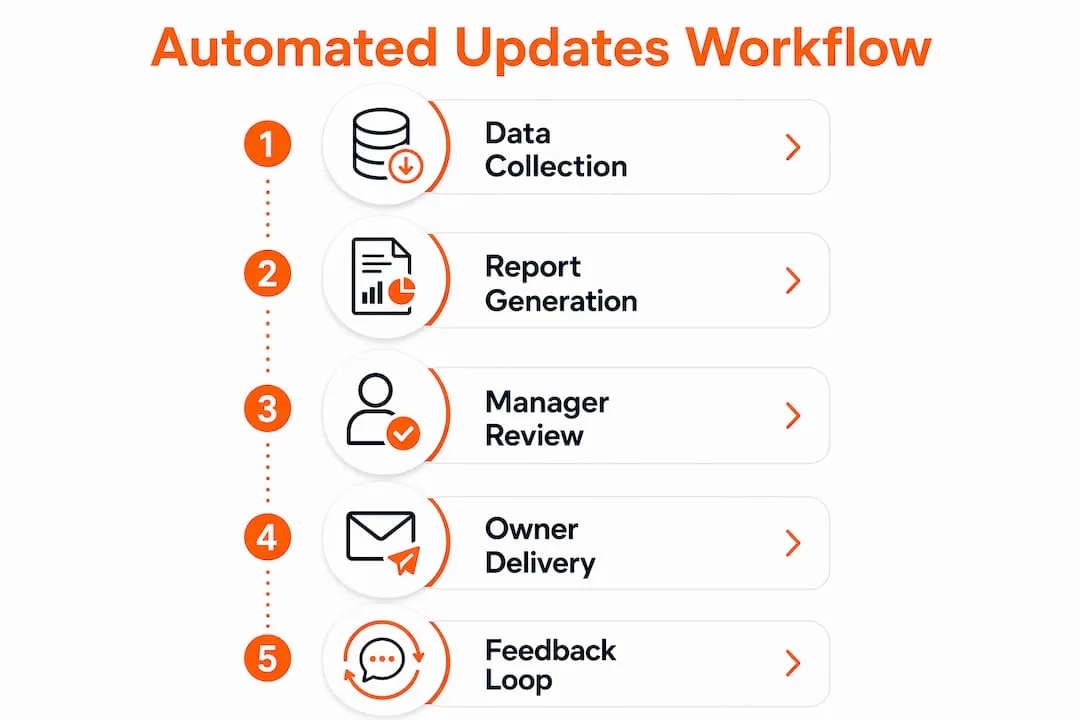
The flow is straightforward: data pull → draft generation → manager review → owner delivery → archive. Every step has a defined trigger and a defined owner.
- Data ingestion: Your PMS, accounting ledger, payment processor, and maintenance system push records to a central data layer. Period close (typically the last day of the month) triggers the pull.
- Field mapping and transform: Each report field maps to a single source field. Gross rent traces to the PMS reservation record; maintenance costs trace to the work-order system. No mapping, no field.
- Draft generation: The report engine renders the template with live data, flags variances above your defined threshold, and queues the draft for manager review.
- Human review gate: The manager checks major expense variances, uncategorized line items, open work orders, and any PII that should be redacted. This step requires an explicit approval action, not just a passive sign-off.
- Distribution: Approved reports go out via email and/or owner portal on schedule. Delivery receipts are logged automatically.
- Archive: Every sent version is stored with approver name, timestamp, and version notes.
The review gate is where your reputation lives. A draft report with an uncategorized $4,000 expense or a misassigned property can destroy owner trust in seconds. Require explicit approval — not just a timer — before any report leaves your system.
Ownership changes add another layer of complexity. When a property transfers between owners, cascading logic must realign all child records — open work orders, pending invoices, and active reservations — to the new owner. Without it, you get orphaned records and reports that go to the wrong person.
Operational best practices for owner-update automation
Do automate:
- Scheduled monthly financial summaries
- Inspection report population from your inspection app
- Occupancy snapshots triggered by period close
- Distribution statements tied to payment processor confirmations
- Exception alerts for costs above your defined threshold
Never fully automate without review:
- Any report containing a major unresolved maintenance item
- First reports to a new owner after a property transfer
- Reports with negative net distributions
- Any communication that requires manager commentary
Review gate design: Assign a named approver for each property group. Set a 48-hour SLA from draft generation to approval. If approval is missed, the system escalates to a backup approver and holds distribution — it does not send automatically. Log every approval with approver name, timestamp, and any version notes.
Template rules: Every line item needs a label, a dollar amount, and a source reference. Surface variances above 20% with a brief manager annotation. Keep tone professional and direct — owners are investors, not guests.
Pro Tip: Schedule automated reports to generate 2–3 days after month-close, not on the last day of the month. Late invoices from vendors frequently post in the first days of the following month. Capturing them before the report goes out prevents correction cycles and owner confusion.
Which systems to integrate and in what order
| System Type | What It Feeds | Integration Priority |
|---|---|---|
| PMS / Channel Manager (Airbnb, Vrbo) | Reservations, ADR, occupancy, guest data | 1 — Start here |
| Accounting ledger | Revenue, expenses, distributions, 1099 data | 1 — Start here |
| Payment processor | Distribution amounts, payment dates | 2 |
| Maintenance / work-order system | Work order IDs, costs, vendor, status | 2 |
| Inspection / photo app | Condition scores, flagged items, photos | 3 |
| Market-data feed | Comparable rates, occupancy benchmarks | 4 |
Start with accounting and PMS. Those two sources power the financial summary and occupancy snapshot — the sections owners read first. Add maintenance tracking and inspection data in the second phase, then layer in market context once the core workflow is stable.
Every report field must trace to a specific source and a specific source field. If a field has no mapped source, it stays blank or gets flagged — it never gets estimated.
How do you measure whether owner-update automation is working?
| KPI | Suggested Benchmark | Source |
|---|---|---|
| Report delivery timeliness | Within 24 hours of period close | US Tech Automations |
| Manual time saved (200-unit portfolio) | 8–15 hours per month | US Tech Automations |
| Owner open/download rate | Track trend; flag drops | Internal |
| Reduction in ad-hoc owner inquiries | Measurable decline after first 2 cycles | Internal |
| Report accuracy / error rate | Zero uncaught errors post-review | Internal |
** Stat to know:** Automated delivery within 24 hours of period close compares to 5–10 days for manual reporting. For a portfolio of this size, automation typically results in a measurable recovery of staff time each month, with notable savings across data compilation, formatting, and distribution logistics.
Owner retention is the lagging indicator that matters most. Managers who deliver consistent, accurate, on-time reports retain owners longer. Track it quarterly.
Step-by-step checklist to implement automated owner updates
- Audit data quality. Validate that expenses are tagged (preventive vs. reactive), transactions are categorized, and owner-property mappings are current. Bad upstream data produces misleading AI-generated reports.
- Map every report field to a source field. No field goes live without a confirmed data source.
- Choose and configure templates. Build templates for monthly summary, inspection report, maintenance log, and ad-hoc alert. Define variance thresholds that trigger manager annotations.
- Configure triggers and schedules. Set period-close triggers, inspection-completion triggers, and cost-threshold triggers for exception alerts.
- Set up the review gate and SLAs. Assign approvers, set the 48-hour SLA, and configure escalation rules for missed approvals.
- Pilot with 5–10 properties. Choose a mix: high-activity properties, a recent ownership transfer, and at least one property with recent maintenance. Run two full cycles before expanding.
- Collect pilot feedback. Ask owners if the format is clear and if they received reports on time. Ask your team where the review gate created friction.
- Roll out and monitor KPIs. Track delivery timeliness, error rate, and owner inquiry volume for the first 90 days.
Configure exception alerting for events that require immediate owner notification: major repairs above your cost threshold, eviction proceedings, and prolonged vacancy. These should never wait for the monthly cycle.
Also test sync schedules carefully. Some platforms require scheduled jobs to propagate ownership changes, and initial record states affect behavior — a property created before your automation rules were configured may not update correctly without a manual trigger.
Common pitfalls and U.S. compliance considerations
Failure modes to watch:
- Unmapped fields that render blank or pull incorrect data
- Orphaned records after ownership transfers (new owner gets old owner’s data)
- Sending draft reports before manager approval
- Incorrect owner assignments when a property changes hands mid-month
Data hygiene is the foundation. Automation amplifies whatever is in your data. Expenses that are untagged, transactions that are miscategorized, and owner mappings that are stale will all surface in owner reports — at scale, and on schedule. Fix the source, not the output.
Security and privacy controls:
- Encrypt reports in transit (TLS) and at rest
- Apply role-based access so only the assigned manager and owner can view each report
- Minimize PII in report bodies — use owner IDs, not full SSNs or bank account numbers
- Retain audit trails and sent receipts per your state’s record-retention requirements (consult a qualified attorney for your specific jurisdiction)
Error correction workflow: When a report goes out with an error, retract it immediately via the portal, issue a corrected version with a version note explaining the change, and log both the original and the correction in your audit trail. Version history is your protection.
Sample templates for email and portal summaries
Email subject lines:
[Property Name] — March Owner Statement | Net: $[Amount]⚠️ Urgent: Maintenance Alert — [Property Address] | Action Required
Portal summary header (3 lines):
- Rent Collected: $X,XXX | Net to Owner: $X,XXX | Vacant Nights: X
- Open Work Orders: X | Period: March 1–31, 2026
- Full statement and receipts available in your owner portal.
Maintenance snippet example:
- Item: HVAC filter replacement | Cost: $185 | Status: Completed March 14 | Vendor: ABC HVAC Services
Keep the email body under 200 words. Owners scan, they don’t read. Put the net distribution number in the subject line — it’s the first thing they look for. Link to the full portal report for anyone who wants the detail. Tone stays professional and factual: no apologies for costs, no hedging on numbers.
Key Takeaways
Automated owner updates work when data is clean, every field maps to a source, and no report ships without a manager’s explicit approval.
| Point | Details |
|---|---|
| Human review gate is mandatory | No automated report should distribute without explicit manager approval — it protects owner trust and your reputation. |
| Time savings are measurable | For a 200-unit portfolio, automation typically recovers 8–15 hours per month, per industry data. |
| Integration order matters | Start with accounting and PMS; add maintenance and inspections next; layer in market data last. |
| Pilot before full rollout | Run 5–10 properties through two full cycles, including a recent ownership transfer, before expanding. |
| Realtevoos Command Center | Realtevoos consolidates PMS, accounting, maintenance, and owner portal delivery in one AI-powered workflow with a built-in review gate. |
A vendor-first perspective on building owner-update workflows
Most managers underestimate how much of the automation problem is actually a data problem. The workflow itself — triggers, templates, delivery — takes 2–3 weeks to configure. What takes longer is cleaning up the upstream data: tagging expenses correctly, validating owner-property mappings, and reconciling historical records that were never categorized. Managers who skip that step get automated reports that are fast and wrong.
The other thing that surprises teams is how much the review gate changes the job. It does not eliminate manager involvement — it focuses it. Instead of spending hours compiling data, your team spends 15 minutes per cycle reviewing a draft and approving it. That is a fundamentally different use of skilled time, and owners notice the difference in report quality almost immediately.
Realtevoos integrates directly with Airbnb, Vrbo, and common PMS platforms, pulling reservation and financial data into a single reporting layer. The AI-driven report assembly handles field mapping and draft generation; the manager review gate is built into the workflow, not bolted on. Implementation typically runs 2–3 weeks, with measurable time savings after the first reporting cycle.
Realtevoos Command Center handles this for you
Fewer owner calls. Faster reporting. A workflow your team can actually trust. That is what Realtevoos Command Center delivers for vacation-rental managers who are done patching together manual reporting processes.

What you get out of the box:
- AI-driven report assembly pulling from Airbnb, Vrbo, your PMS, and your accounting system
- Built-in manager review gate with approver assignment, SLA tracking, and audit trail
- Multi-channel delivery: scheduled email plus a 24/7 owner portal
- Exception alerting for high-cost repairs, prolonged vacancy, and ownership transfers
- Cascading ownership logic so child records stay aligned when properties change hands
- Pilot onboarding in 2–3 weeks with hands-on setup support
Ready to see it in action? Request a demo and run your first automated owner report cycle with your actual portfolio data.
Useful sources and next references
- Automate Property Management Owner Reporting — US Tech Automations: workflow design, time-savings benchmarks, and human-review gate guidance
- How to Set Up Automated Monthly Reports for Owners — Buildium: delivery preferences and inspection data integration
- Automate Account Ownership Transfers — Clientell AI: cascading ownership logic and orphaned-record prevention
- Automation Actions Explained — ActiveCampaign: how automation triggers and owner-update actions interact
- Realtevoos Blog: The Role of Automation in Owner Relations — practical guidance on automating owner communications
- Realtevoos Blog: Owner Reporting in Property Management — report structure and owner expectations
- Why news updates matter for venues — hospitality context on manual review requirements before automated communications go live