How to track rental revenue for maximum profitability
Learn how to track rental revenue effectively. Maximize profits and gain clarity on your true income with our expert guide!

How to track rental revenue for maximum profitability
Missing expenses, confusing manager statements, and inconsistent recordkeeping quietly drain profits from vacation rental portfolios every single month. Many property owners assume they’re earning well, only to discover that their true net income is far lower than expected once all costs are accounted for. The gap between gross rental income and actual profit is where most financial surprises hide. This guide walks you through exactly what to track, which tools to use, and how to build a system that gives you a clear, accurate picture of your rental earnings so you can make smarter decisions and grow your income with confidence.
Table of Contents
- What you need to track rental revenue effectively
- Step-by-step process to track your rental revenue
- Comparing tracking methods: Spreadsheets vs. accounting software
- Troubleshooting and common mistakes to avoid
- Measuring your results and optimizing for profit
- The hard truth about tracking rental revenue
- Simplify tracking with one powerful platform
- Frequently asked questions
Key Takeaways
| Point | Details |
|---|---|
| Capture all sources | Accounting for every income and expense stream unlocks true profitability. |
| Choose the right tools | STR-specific software prevents hidden costs from going unnoticed. |
| Review regularly | Frequent checks and reconciliations keep your numbers accurate and actionable. |
| Avoid common mistakes | Watch for gaps in owner-paid expenses and avoid relying solely on manager statements. |
What you need to track rental revenue effectively
Now that you understand why tracking matters, let’s set you up for success by getting organized up front.
Before you open any software or build any spreadsheet, you need to gather the right documents and information. Skipping this step is one of the most common reasons property owners end up with incomplete financial records. The data you pull together at the start determines the accuracy of everything that follows.
Here are the core documents and data sources you need:
- Lease agreements and booking confirmations from all channels (Airbnb, Vrbo, direct bookings)
- Bank statements covering all rental-related deposits and withdrawals
- Property manager statements showing gross income, management fees, and disbursements
- Receipts and invoices for maintenance, cleaning, supplies, and repairs
- Mortgage, insurance, and property tax records for fixed cost tracking
- Utility bills if you cover utilities for the property
- Platform payout reports directly from booking channels
Once you have these documents, you need the right tools to organize them. Not all accounting software is built for short-term rentals (STRs). Generic accounting tools like QuickBooks may overlook owner-paid expenses, which means your profit calculations could be significantly off from the start.
Here’s a quick overview of tool categories:
| Tool type | Examples | Best for |
|---|---|---|
| Generic accounting | QuickBooks, Wave | Simple bookkeeping, basic expense tracking |
| Spreadsheets | Google Sheets, Excel | Manual tracking, small portfolios |
| STR-specific platforms | Guesty, RealtevoOS | Full STR expense visibility, automation |
| Channel managers | Lodgify, Hostaway | Booking consolidation, not full accounting |
Using vacation rental management tools built specifically for STRs gives you a major advantage. These platforms understand the structure of rental income, including channel fees, cleaning fees, and owner-paid costs, in ways that generic software simply doesn’t.
Pro Tip: Open a dedicated bank account exclusively for your rental property. This single step makes it dramatically easier to separate business income from personal spending and gives you a clean transaction record for tax time.
Step-by-step process to track your rental revenue
With the right tools and preparations ready, let’s break down the execution process for effective revenue tracking.
Tracking rental revenue isn’t a one-time task. It’s an ongoing workflow that needs to be consistent every month. Here’s the process that works for property owners managing one property or an entire portfolio.
-
Collect all income sources. Pull payout reports from every booking platform you use. Don’t rely on a single manager statement. Airbnb, Vrbo, and direct booking channels each have their own payout structures, and combining them gives you the full income picture.
-
Capture every expense, including owner-paid costs. This is where most owners fall short. Owner-paid expenses like mortgage interest, insurance premiums, and capital improvements often don’t appear on manager statements at all. You have to enter these manually or through a system that prompts you for them.
-
Categorize your expenses properly. Break costs into clear categories: management fees, cleaning, maintenance, utilities, platform fees, insurance, mortgage, and taxes. This categorization is what allows you to spot which cost centers are eating into your margins.
-
Reconcile with your bank account. Every income deposit and expense withdrawal should match what’s in your bank account. If the numbers don’t line up, you have a gap that needs investigating.
-
Use software to automate where possible. STR-specific platforms like Guesty can reveal owner-paid expenses that generic systems miss, giving you a far more accurate view of your actual profitability.
-
Generate a monthly income statement. At the end of each month, produce a simple profit and loss summary. This document becomes your financial baseline for comparing performance over time.
“Understanding your statements is not optional. It’s the only way to know your true net income. If you can’t explain every line item on your report, you don’t actually know how profitable your rental is.”
Pro Tip: When choosing accounting software, prioritize systems that let you create custom expense categories. Generic categories like “miscellaneous” are a red flag. The more granular your expense tracking, the faster you can identify and eliminate unnecessary costs.
Comparing tracking methods: Spreadsheets vs. accounting software
Choosing your tracking method is crucial. Here’s how the major options stack up.
There’s no single right answer for every property owner, but there are clear tradeoffs between manual and automated tracking. Understanding these tradeoffs helps you choose the method that matches your portfolio size and time availability.
| Feature | Spreadsheets | QuickBooks | STR-specific (RealtevoOS, Guesty) |
|---|---|---|---|
| Setup time | Low | Medium | Medium to high |
| STR expense categories | Manual only | Limited | Built-in |
| Owner-paid cost tracking | Manual only | Partial | Automated |
| Multi-property support | Difficult | Moderate | Excellent |
| Channel integration | None | None | Yes |
| Reporting quality | Basic | Good | Advanced |
| Cost | Free | Monthly fee | Monthly fee |
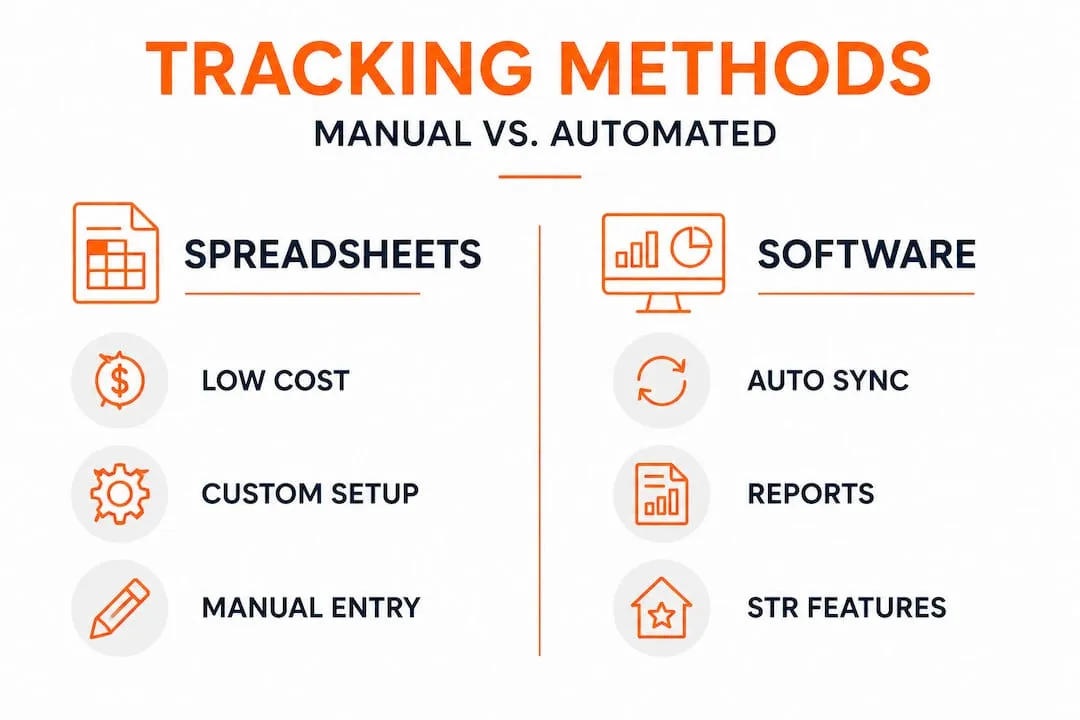
Generic solutions may misreport profitability when expenses are hidden or miscategorized, making it look like you’re earning more than you actually are.
Spreadsheets:
- Pros: Free, flexible, easy to start
- Cons: Error-prone, no automation, hard to scale, easy to miss expenses
QuickBooks and similar tools:
- Pros: Reliable accounting, good for taxes, widely used by accountants
- Cons: Not built for STRs, misses owner-paid costs, no channel integration
STR-specific rental management software:
- Pros: Built for vacation rentals, captures all expense types, integrates with booking channels, automates reporting
- Cons: Higher cost, requires setup time
Studies consistently show that property owners using manual tracking methods miss a significant portion of their actual expenses. Some estimates suggest that owners relying on spreadsheets alone underreport costs by 15 to 30 percent, which directly inflates their perceived profit margins and leads to poor financial decisions.
Troubleshooting and common mistakes to avoid
Even with great tools, it’s easy to fall into certain traps. Here’s what to watch out for.
The most accurate tracking system in the world won’t help you if you’re feeding it incomplete or incorrect data. These are the most common mistakes property owners make, and how to fix them.
Common tracking errors:
- Overlooking maintenance and repair costs. Small repairs add up fast. A $150 plumber visit here, a $200 appliance fix there, and suddenly you’ve missed $2,000 or more in annual expenses. Log every maintenance cost the moment it occurs.
- Inconsistent recordkeeping. Updating your records once a quarter instead of monthly means you’re always working from stale data. Gaps in your records make reconciliation nearly impossible.
- Mixing personal and business funds. Using your personal account for rental expenses is one of the fastest ways to lose track of your true costs. It also creates headaches at tax time.
- Trusting manager statements as the full picture. Manager statements may not show owner-paid expenses, which is one of the most significant pitfalls in rental income tracking. Your manager only reports what flows through their system.
- Ignoring platform fee deductions. Airbnb and Vrbo take their fees before you ever see the money. If you’re tracking only what hits your bank account, you’re already missing a portion of gross income and the associated fees.
- Failing to track security deposit activity. Security deposits held and then returned, or partially withheld, need to be recorded accurately to avoid income misstatements.
Vacation rental oversight requires active engagement from the owner, not passive trust in third-party reports. The more hands-on your review process, the fewer surprises you’ll encounter.
Pro Tip: Block one hour at the end of every month for a full financial reconciliation. Compare your bank statements against your tracking records, verify that all income is logged, and confirm that every expense has a receipt attached. This monthly habit prevents small errors from compounding into major discrepancies.
Measuring your results and optimizing for profit
With your data in hand, here’s how to turn insights into improved results.

Tracking revenue is only valuable if you use the data to make decisions. Raw numbers sitting in a spreadsheet don’t improve your profitability. Interpretation and action do.
Start by reviewing your reports on a regular schedule. Weekly reviews help you catch booking pace issues early. Monthly reviews give you a full income and expense picture. Quarterly reviews let you spot seasonal trends and compare year-over-year performance.
Key performance indicators (KPIs) every property owner should monitor:
- Occupancy rate: The percentage of available nights that are booked. A low occupancy rate signals pricing or marketing issues.
- Average daily rate (ADR): Your average income per booked night. Tracking ADR over time shows whether your pricing strategy is working.
- Revenue per available night (RevPAN): Combines occupancy and ADR into one metric. This is the most complete measure of revenue performance.
- Net profit margin: After all expenses, what percentage of gross income remains as profit. This is the number that actually matters.
- Cost per booking: Total operating costs divided by the number of bookings. Rising cost per booking signals inefficiency.
Careful tracking exposes hidden expenses, making profitability transparent and giving you the data you need to act.
Once you have clean data, you can take specific actions to improve results. If your occupancy rate is below 70 percent in peak season, your pricing may be too high or your listing needs optimization. If your maintenance costs are rising each quarter, it may be time to negotiate better rates with service providers or invest in preventive maintenance.
Analyzing rental data at the property level also helps you compare performance across your portfolio. If one property consistently underperforms, you can investigate the specific cost drivers or booking patterns that explain the gap.
| Metric | What it tells you | Optimization action |
|---|---|---|
| Occupancy rate | Demand and pricing alignment | Adjust rates, improve listing quality |
| Average daily rate | Pricing effectiveness | Test dynamic pricing strategies |
| Net profit margin | True profitability | Reduce unnecessary costs, increase ADR |
| Cost per booking | Operational efficiency | Automate tasks, renegotiate vendor contracts |
The hard truth about tracking rental revenue
Most guides on rental income tracking focus on the mechanics. Here’s what they leave out.
The most common mistake we see property owners make isn’t using the wrong software or skipping a reconciliation step. It’s trusting that their property manager’s statement tells the whole story. It doesn’t. It can’t. Manager statements are designed to report what flows through the management company’s system. Your mortgage, your insurance, your capital improvements, and your owner-paid maintenance costs are invisible to that statement.
Conventional wisdom often misses that trusting the management company’s statement can hide large expenses, sometimes thousands of dollars per year per property. When you multiply that across a portfolio of five, ten, or twenty properties, the financial distortion becomes serious.
Manual tracking and generic accounting software have the same fundamental problem. They were not designed for the unique financial structure of short-term rentals. They don’t understand channel fees, cleaning fee pass-throughs, or the split between owner-paid and manager-paid costs. Trying to force STR finances into a QuickBooks template is like using a road map to navigate a hiking trail. The tool isn’t wrong, it’s just built for a different job.
The owners who achieve genuine profitability aren’t necessarily the ones with the best properties or the highest ADRs. They’re the ones who know their actual numbers. They can tell you their net margin, their cost per booking, and exactly where every dollar went. That level of clarity only comes from purpose-built owner-specific tools and a consistent tracking discipline.
Automation isn’t a luxury at this point. For any owner managing more than one or two properties, manual tracking is a liability. The time cost alone is significant, and the error rate in manual systems is high enough to materially affect your financial decisions. Transparency and automation are not nice-to-haves. They’re the foundation of a profitable, scalable rental operation.
Simplify tracking with one powerful platform
To wrap up, let’s connect all the dots with a tool built for owners like you.
Tracking rental revenue accurately requires the right system, and that’s exactly what the RealtevoOS platform is built for. It consolidates data from Airbnb, Vrbo, and other booking channels into a single dashboard, giving you real-time visibility into revenue, expenses, occupancy, and net profit across your entire portfolio.

RealtevoOS goes beyond basic reporting. Its AI-driven automation handles owner reporting, flags maintenance costs, and ensures that every expense, including owner-paid costs that other systems miss, is captured and categorized correctly. You get the financial clarity that manual tracking and generic software simply can’t deliver. If you’re serious about maximizing profitability and scaling your rental operation without losing control of your numbers, RealtevoOS gives you the command center to do it.
Frequently asked questions
Why is rental revenue often underreported by property owners?
Many property owners rely solely on manager statements, which don’t include owner-paid expenses like insurance, mortgage interest, and capital repairs, leading to inflated profit estimates.
Should I use regular accounting software or STR-specific tools?
STR-specific tools are the stronger choice because they capture the unique expense structure of vacation rentals. Generic accounting tools like QuickBooks don’t account for channel fees, cleaning pass-throughs, or owner-paid costs the way purpose-built platforms do.
What reports should I regularly review to track rental performance?
Review monthly income statements, itemized expense breakdowns by category, and occupancy reports to get a complete picture of financial performance and spot trends before they become problems.
Can automated software prevent common tracking mistakes?
Yes. Automation eliminates the manual data entry errors that cause most tracking gaps, and STR-specific platforms are designed to prompt you for expense types that generic tools ignore entirely.