Rental property workflow: streamline your vacation rentals
Discover what is rental property workflow and learn how to streamline your vacation rentals for higher efficiency and profitability.

Rental property workflow: streamline your vacation rentals
Managing vacation rentals looks straightforward from the outside. Book a guest, clean the unit, repeat. But experienced operators know the reality is far messier. Between guest inquiries, calendar syncs, turnover coordination, maintenance tickets, and owner reports, the hours stack up fast. Published efficiency data suggests that better automation and standardization can materially cut operational workload, yet most property managers still rely on fragmented, manual processes that eat into profitability. Understanding your rental property workflow—not just your tools—is what separates operators who scale from those who stall.
Table of Contents
- Defining the rental property workflow: phases and triggers
- The real impact of workflow inefficiency on property managers
- Where automation helps—and where it fails: lessons from the field
- Building an effective rental workflow: step-by-step guide
- Why most rental workflow advice misses the hidden levers
- Streamline your workflow and scale with confidence
- Frequently asked questions
Key Takeaways
| Point | Details |
|---|---|
| Workflow phases matter | Understanding and organizing your workflow by phase reduces stress and errors. |
| Automation saves time | Smart automation can cut your operational hours in half if continually monitored. |
| Prepare for edge cases | Workflow design must account for cancellations and unpredictable booking changes. |
| Continuous improvement | Regularly review and refine workflows for best results as your portfolio grows. |
Defining the rental property workflow: phases and triggers
Before you can fix a workflow, you need to know exactly what one looks like. A rental property workflow is not just a checklist. It is a structured sequence of actions, decisions, and hand-offs that move a reservation from inquiry to completion and keep the property ready for the next guest.
The clearest way to define this structure is by phases and triggers: pre-arrival, during stay, turnover, ongoing maintenance, and performance review. Each phase is activated by a specific operational trigger, such as a reservation confirmed, a guest checking out, or a maintenance request being submitted. Once you map these phases to their triggers, you stop reacting and start operating proactively.
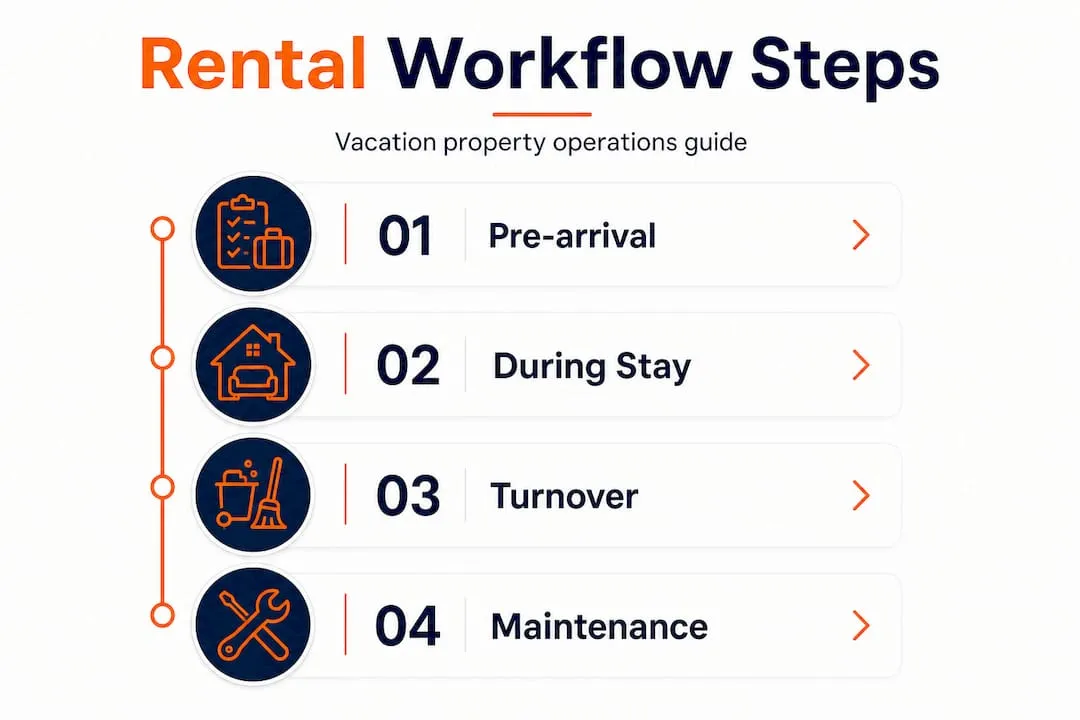
For single-property owners, this mapping is manageable in a spreadsheet or a simple task manager. But the complexity multiplies fast when you manage five, ten, or twenty properties across different markets. Each property may have different cleaning vendors, different smart-lock providers, different owner expectations, and different local regulations. What worked for one becomes noise for another.
Workflow phases and their triggers at a glance:
| Phase | Primary trigger | Key actions |
|---|---|---|
| Pre-arrival | Reservation confirmed | Send welcome message, schedule cleaning, verify payment |
| During stay | Guest check-in | Monitor requests, respond to issues, mid-stay check-in |
| Turnover | Guest checkout | Cleaning, inspection, restocking, damage review |
| Maintenance | Request submitted or scheduled | Diagnose, assign vendor, track resolution |
| Performance review | Monthly or post-stay | Analyze revenue, occupancy, guest reviews, owner reporting |
The trigger-based model is especially powerful because it removes ambiguity. Your team does not need to guess what comes next. When a specific event fires, a specific response begins. This is the foundation that all automation and team coordination are built on.
The real impact of workflow inefficiency on property managers
Now that the framework is clear, consider what happens when it breaks down or was never built in the first place. The numbers are striking. On average, managers spend between 33 and 56 hours per month per property in manual operations, with that number climbing to 80 hours or more during peak season. That is not a small inefficiency. That is a full-time job per property.
The biggest drain? Guest communication. It accounts for 45.5% of total management time, meaning nearly half of your operational hours disappear into answering messages, sending reminders, handling complaints, and coordinating check-in logistics. For a portfolio of ten properties, that is potentially hundreds of hours per month on communication alone.
“High automation can reduce up to 50% of operational workload in vacation rental management, but it still requires active oversight to be effective.” — Polaroo, 2025
Beyond guest communication, the most common workflow bottlenecks include:
- Calendar synchronization failures across platforms like Airbnb, Vrbo, and direct booking sites, leading to double bookings or missed updates.
- Turnover coordination gaps, where cleaning teams are not notified in time or lack updated inspection checklists.
- Maintenance tracking issues, where requests fall through the cracks because they were texted instead of formally submitted.
- Owner reporting delays, where financial performance data is assembled manually each month and often contains errors.
Each of these bottlenecks has a cost. Double bookings damage your reputation. Late turnovers result in poor first impressions and lower review scores. Missed maintenance items escalate into expensive repairs. Delayed or inaccurate owner reports erode trust and invite micromanagement. The cumulative effect of these inefficiencies is not just frustrating. It actively limits how many properties you can profitably manage.
Where automation helps—and where it fails: lessons from the field
Understanding what’s at stake makes it tempting to automate everything immediately. But automation is a tool, not a solution. Used well, it eliminates repetitive tasks and reduces human error. Used carelessly, it creates new categories of problems that are harder to spot.
Here is an honest comparison of where automation delivers and where it lets operators down:
| Automation win | Automation pitfall |
|---|---|
| Scheduled guest messaging (pre-arrival, mid-stay, review request) | Generic messages that miss context or feel robotic |
| Automated lock code generation and delivery | Sync failures when reservations are modified or cancelled |
| Dynamic pricing updates across channels | Set-and-forget pricing that misses local events or demand shifts |
| Cleaning team notifications triggered by checkout | Incorrect trigger timing when guests extend their stay |
| Owner reports generated from live data | Incomplete reports when data sources are not fully integrated |
One of the most common and least discussed pitfalls involves booking calendar changes and gaps after cancellations. When a reservation is cancelled, the trigger that started your automation (say, a lock code being generated or a thermostat being set to an arrival profile) does not automatically reverse. Dependent systems need to be reconciled. Smart locks may still have an active code. Thermostats may still be on an arrival setting for an empty property. These are not edge cases. They happen regularly, and they create real security and energy cost problems.
Pro Tip: Never treat automation as set-and-forget. As pricing tools like PriceLabs recommend, reviewing automated output regularly—especially messaging quality and pricing logic—is what keeps automation working for you rather than against you.
When an automation does break down, here is a structured recovery sequence:
- Identify the failure point. Was it a trigger that did not fire, or a downstream action that failed to execute?
- Check all dependent systems. After a calendar change, verify smart locks, thermostats, utilities, and any connected vendor notifications.
- Notify affected parties manually. If a cleaner was not alerted or a guest received incorrect access information, communicate directly and immediately.
- Audit the automation rule. Review whether the logic needs a conditional branch (for example, what happens if a cancellation occurs within 24 hours of the original check-in time?).
- Document the failure and its resolution. This becomes your playbook for improving the system, not just patching it.
Learning to optimize seasonal rental calendars is directly connected to this recovery mindset. Gaps created by cancellations or extended stays are where automation breaks most often, and where manual oversight still earns its keep.
Building an effective rental workflow: step-by-step guide
With a realistic picture of automation’s strengths and limitations in place, here is how to actually build or refine a workflow that holds up under operational pressure.
-
Audit your current process. Write down every action you or your team takes from the moment a reservation is confirmed to the moment the post-stay review is requested. Include manual tasks, verbal hand-offs, and anything that lives in someone’s head rather than a system. This map will reveal your hidden time costs.
-
Identify triggers for each phase. Use the phase-trigger table from the earlier section as your starting point. For every phase in your operation, define the specific event that should start it and the specific output that signals it is complete.
-
Standardize before you automate. This is the step most operators skip. Before connecting tools and rules, write standard operating procedures (SOPs) for each phase. Automation codifies your process. If the process is inconsistent before automation, you will automate inconsistency.
-
Prioritize high-volume repetitive tasks for automation first. Guest messaging, lock code delivery, and cleaning notifications are high-frequency and low-variability. Start here before attempting to automate complex or judgment-based tasks.
-
Build in exception handling. For every automated rule, define what happens when it fails or when input conditions change. This is especially critical for cancellations, modifications, and emergency maintenance situations.
-
Test with a single property first. Roll out new workflows in isolation before applying them across your portfolio. This limits the blast radius of any configuration errors and lets you gather real feedback before scaling.
-
Schedule regular workflow reviews. Published data on STR efficiency consistently shows that gains come from iteration, not one-time setup. Set a monthly or quarterly review cadence where you examine task completion rates, guest scores, and team feedback.
Pro Tip: Build a formal feedback loop with your cleaning and maintenance vendors. They are the front line of your turnover and inspection process, and they frequently notice workflow gaps that never surface in your dashboard. A 15-minute monthly call with your lead cleaner can reveal more operational insight than any report.
The critical integration readiness point here is this: the more complex your workflow becomes, the more important it is that your systems are designed to talk to each other. A vacation rental command center that consolidates data from your booking channels, smart home devices, vendor communications, and financial reporting is not a luxury at scale. It is the infrastructure that makes everything else function.
Why most rental workflow advice misses the hidden levers
Most guides on rental workflow optimization focus on tools: which software to use, which templates to apply, which channels to connect. That advice is not wrong. But it skips the part that actually determines success.
The operators who genuinely transform their operations do not just install better tools. They change how their teams think about coordination. Workflow gains that stick come from two sources that rarely get discussed: invisible hand-offs and front-line experimentation.
Invisible hand-offs are the moments where one person’s task ends and another begins, with no formal acknowledgment that the baton has been passed. These are where most operational failures happen. No automation platform can fix a hand-off that was never clearly defined in the first place. This is why the SOP-before-automation step in the workflow guide above is not optional. It is the whole game.
Front-line experimentation is equally important. The best workflow improvements we have seen come from cleaning supervisors who redesigned their inspection checklist, from a guest services coordinator who rewrote three standard messages that were generating confusion, and from maintenance technicians who flagged a recurring HVAC issue that the data never surfaced. No algorithm discovered these gains. People did.
The uncomfortable truth about rental workflow mastery is that no workflow is ever truly finished. Markets change. Guest expectations shift. Platforms update their APIs. Staff turns over. The operators who scale successfully treat their workflow as a living system that requires regular attention, not a completed project that runs itself.
And through all of it, the guest experience must remain the fixed point. It is easy to get absorbed in operational metrics and lose sight of the fact that every workflow improvement ultimately exists to serve the person staying in your property. Efficiency that degrades the guest experience is not a win. It is just a different kind of problem.
Streamline your workflow and scale with confidence
The principles in this article represent real operational change, and applying them at scale requires more than good intentions.

RealtevoOS is built specifically for property managers who are serious about making this transition. The platform consolidates data from Airbnb, Vrbo, and all your key channels into a single intelligent dashboard, giving you real-time visibility across every property, market, and phase of your workflow. AI-driven automation handles guest communication, owner reporting, and maintenance escalation so your team focuses on decisions, not data entry. Whether you manage 10 properties or 100, all-in-one rental operator solutions like RealtevoOS give you the operational infrastructure to grow without adding proportional overhead.
Frequently asked questions
What exactly does a rental property workflow include?
A rental property workflow covers all operational steps from guest inquiry through checkout, maintenance, and financial reconciliation, structured into phases like pre-arrival, turnover, and performance review each tied to specific triggers.
How much time can automation save in rental management?
Well-implemented automation can reduce up to 50% of operational workload, saving dozens of hours per property monthly, though consistent human oversight remains necessary for best results.
What are common issues with automating property workflows?
Calendar gaps and cancellations require reconciliation across dependent systems like smart locks and thermostats, making monitoring and exception handling essential parts of any automated setup.
Do I need specialized tools for multi-property management?
Manual workflows may suffice for one or two properties, but specialized software becomes essential once you are managing multiple properties across different markets, channels, and vendor relationships.