Airbnb Message Templates That Schedule and Scale for Hosts & Managers
Reusable Airbnb message templates with step-by-step scheduling, personalization rules, and multi-listing governance for hosts and managers. Practical...

Airbnb Message Templates That Schedule and Scale for Hosts & Managers
A solid Airbnb message templates library gives you reusable scripts for every guest stage, plus the scheduling steps to send them automatically at the right moment. Built and scheduled correctly, these templates cut hours of repetitive typing each week, keep your response rate near 100%, and make guests feel looked after even when you’re asleep.
TL;DR:
- Use templates for specific guest stages, ensuring the most critical information, like check-in details, is personalized and delivered at the right time.
- Maintain updated, property-specific facts in a shared reference document and run regular audits to prevent outdated or incorrect details in automated messages.
- Avoid off-platform links, personal contact sharing, or legal-sensitive language in templates to stay compliant and protect guest privacy.
- Start with three core templates—booking confirmation, pre-arrival details, and checkout reminders—and expand as your process becomes more efficient.
- Consider centralized management platforms for multiple listings to streamline edits, ensure consistency, and gain insights on message responsiveness.
Table of Contents
- Airbnb Message Templates for Every Stage of the Guest Journey
- How to Create and Schedule Quick Replies in Airbnb Messages
- Personalizing Templates Without Losing the Time Savings
- Airbnb Scheduled Messages vs. a Full Messaging Tool
- Keeping Templates Accurate Across Multiple Listings
- Legal and Privacy Considerations in Guest Messaging
- Common Mistakes Hosts Make With Message Templates
- What Structured Messaging Actually Saves You
- Centralize Templates Across Every Listing With RealtevoOS
- Where to Learn More About Airbnb Messaging Tools
- Sources
Airbnb Message Templates for Every Stage of the Guest Journey
Airbnb calls these saved scripts “quick replies,” but most hosts just call them templates. Either way, the goal is the same: answer the question before the guest has to wait for it. Below are ready-to-copy scripts organized by the point in the guest journey where they matter most, based on the seven-touch cadence that top-performing hosts rely on.
Pre-booking inquiry. Someone messages before they book, usually with one specific question. Answer that question first, then invite the booking.
Booking confirmation. Send this within minutes of a reservation landing. Keep it warm and short. Guests are often anxious right after booking that they picked the wrong place.
Pre-arrival (48 to 72 hours out). This is where you load the practical details: address, entry code timing, parking instructions, and wifi. This is also the one message hosts most often forget to personalize, and it’s the one guests reread the most.
Check-in day and first-morning check. One short message on arrival day, another the next morning. Both should be brief enough to read in five seconds on a phone.
Mid-stay and issue messages. Noise complaints, refund requests, and neighbor disputes need a calmer, more procedural tone. Acknowledge, then point to the resolution path rather than promising an outcome you can’t guarantee.
Checkout and post-stay review request. Combine a simple checklist with genuine thanks, and send the review ask a few hours after checkout, not the moment they walk out the door. Hospitality hosts can streamline this process using advanced messaging and guest-experience tools designed specifically for hotels, like those offered by Served for hotels.
Difficult scenarios. Service-animal questions and discount requests deserve their own scripts, written in advance so you’re never improvising under pressure.
- Service animal inquiry: “Service animals are always welcome at [property] with no extra fee. Just let us know if you need anything to make the stay more comfortable.”
- Discount request: “I appreciate you asking! Our rates are set to stay competitive for the season, so I’m not able to offer an additional discount right now, but I hope you’ll consider us for a future stay.”
- Firm refusal (extra guests, early check-in beyond capacity): “I wish I could accommodate that, but it would put us outside what the listing allows. Let me know if there’s another way I can help make the stay work.”
Pro Tip: Keep a “difficult scenario” folder of scripts you’ve already thought through calmly. Typing a refusal in the moment, when you’re frustrated, is how hosts accidentally write something that ends up as a bad review screenshot.
How to Create and Schedule Quick Replies in Airbnb Messages
Airbnb’s built in tool for this lives under Messages, and setting it up takes about ten minutes once you have your scripts written.
- Open the Airbnb app or desktop site and go to Messages, then tap the settings icon to find Quick Replies.
- Select Create Quick Reply, write your message, and give it a short internal name so you can find it fast later.
- Insert placeholders for guest name, check-in date, or listing address using the details tool. These only populate correctly if the corresponding fields are filled out completely on your listing and reservation, so an incomplete address or missing wifi field in your listing settings will leave a blank gap in the guest’s message.
- Set the trigger. Choose whether the message sends automatically (a scheduled quick reply, such as “2 days before check-in”) or stays available for you to send manually with one tap.
- Review scheduled sends in the timeline view, which shows exactly when each message is queued to go out for a given reservation, and lets you edit or cancel before it sends.
- Account for last-minute bookings. If a guest books after your normal trigger window has passed, for example the “3 days before” pre-arrival message on a booking made the day before check-in, Airbnb can be toggled to send the scheduled message immediately at booking rather than skip it.
Two practical checks before you rely on any of this: quick replies max out at 4,000 characters, and Airbnb auto-translates messages into the guest’s language on their end, so avoid idioms or slang that don’t translate cleanly. Always send a test version to yourself or a staged reservation before turning a new template loose across live bookings.
Personalizing Templates Without Losing the Time Savings
The placeholders do the heavy lifting: guest first name, check-in and checkout dates, wifi network and password, and entry codes all pull automatically from your listing and reservation data once the fields are populated. The difference between a template that feels robotic and one that feels considerate is usually one sentence.
Compare these two pre-arrival messages:
- Bare template: “Check-in instructions are attached. Wifi is [wifi info].”
- Personalized version: “Hi Maria, so excited to have you and your family at the lake house next week! Wifi is [wifi info], and the hot tub takes about 20 minutes to heat up, so start it right when you arrive if you want it ready for the evening.”
A few rules of thumb keep this simple:
- Always insert the guest’s name. It’s the single highest-impact placeholder and costs nothing extra.
- Never load sensitive, manual-only details (a lockbox override code, an owner’s personal cell number) into an automated template that fires on a schedule.
- Reserve manual personalization for genuine exceptions: a special request, a returning guest you remember, or a VIP booking that deserves more than a script.
Pro Tip: If a guest mentions something specific in their initial message, like a birthday or an anniversary, reply manually instead of firing your standard confirmation template. That single deviation from the script is often what turns a five-star stay into a five-star review that specifically mentions you.
Airbnb Scheduled Messages vs. a Full Messaging Tool
Airbnb’s native scheduled quick replies work well for one property or a handful of straightforward triggers. Once you’re managing several listings, or juggling bookings across Airbnb, Vrbo, and direct channels, the built-in tool starts to strain, since each platform manages its own separate quick-reply library with no shared view across your portfolio.
A property management system or dedicated messaging tool becomes worth it when you notice these signals:
- You’re editing the same wifi password or access code across five separate listing dashboards every time it changes.
- Bookings arrive from multiple channels and you’re manually copying the same message into different inboxes.
- You have recurring triggers that Airbnb’s native tool can’t handle, like routing a maintenance complaint to a specific team member automatically.
Automation should always handle timing and structural details. It should never fully replace your judgment on tone, or on a guest’s specific unusual request.
Keeping Templates Accurate Across Multiple Listings
Wrong details in an automated message, a wifi password for the wrong unit, a parking instruction that doesn’t apply, erode guest trust fast and generate avoidable complaints.
- Name each template with a date stamp and property identifier (for example, “PreArrival_LakeHouse_Jan2026”) so outdated versions don’t linger in your library by accident.
- Run a quick audit weekly, or before each new season, checking that every placeholder still maps to current listing details.
- Test new or edited templates against a staged reservation, not a live one, to catch broken placeholders before they reach a real guest.
- If you work with co-hosts, assign clear ownership: one person edits and version-controls templates, others request changes through that person rather than editing directly.
Pro Tip: Keep your property-specific facts (door codes, trash pickup days, parking rules) in one shared reference doc that feeds your templates, rather than memorizing details separately for each listing. It’s the single easiest way to stop cross-property errors before they happen. A structured approach like this is covered in more depth in guest communication best practices for property managers.
Legal and Privacy Considerations in Guest Messaging
Airbnb’s messaging system is the platform’s official record of your conversation with a guest, and that record can be pulled into a dispute or a resolution case, so anything you write in a template should hold up if reviewed later. Avoid promising outcomes you can’t guarantee, like a specific refund amount before a claim is actually reviewed, since that written promise can be used against you if circumstances change.
Guest phone numbers, emails, and payment details that surface in a conversation should stay inside Airbnb’s messaging system rather than being copied into outside spreadsheets or personal contact lists without a clear reason and the guest’s awareness. Airbnb’s own policies restrict moving communication or payment off-platform specifically to protect both hosts and guests, and templates that push guests toward off-platform contact (a personal WhatsApp number, an outside booking link) can violate those terms.
Be careful with any template touching accessibility, service animals, or discount eligibility, since these brush against fair housing and anti-discrimination expectations. A script that treats every guest identically on these topics, rather than making case-by-case judgment calls that could look inconsistent, is the safer default. When in doubt on a specific legal question for your situation, a local attorney or your property manager’s legal counsel is the right call, not a generic template.
Common Mistakes Hosts Make With Message Templates
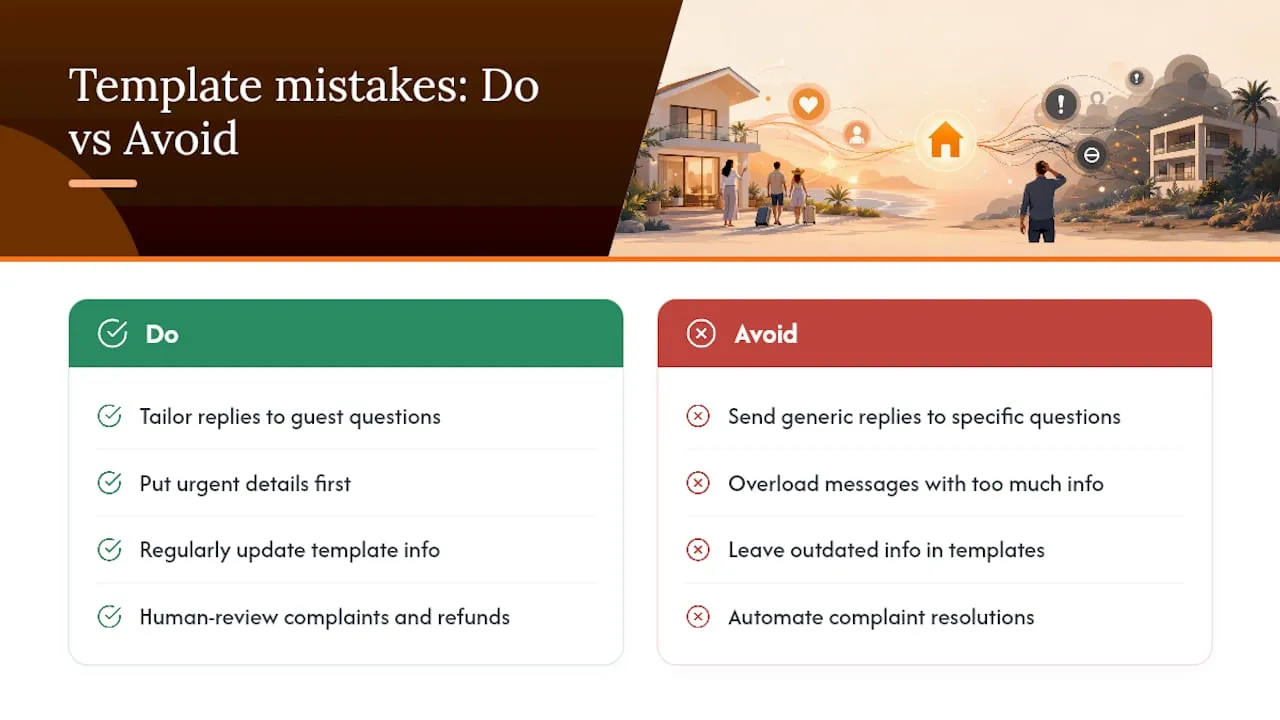
The most common failure isn’t a badly written template. It’s a template applied to the wrong situation.
Sending a generic, clearly automated message immediately after a guest asks something specific is the fastest way to make a template feel impersonal. If a guest asks a direct question, a template that ignores it and answers something adjacent reads as tone-deaf, even when the information itself is accurate.
Overloading a single message with too much information is another frequent problem. A pre-arrival message that buries the door code in the fourth paragraph, after three paragraphs of house rules, means guests miss the one detail they actually need at that moment.
Letting templates go stale is just as damaging. A wifi password that changed six months ago, a parking instruction for a spot you no longer have access to, a “message me anytime” line from a host who no longer personally manages the property. Each of these creates a small trust gap that adds up.
Finally, treating every message with the same level of automation backfires. A refund request or a genuine complaint deserves a human read, even if a template drafts the opening line. Automating the acknowledgment is fine. Automating the resolution is not.
What Structured Messaging Actually Saves You
Hosts who centralize their templates instead of retyping answers from memory report meaningful time savings, with some operational guides citing up to 10 hours a week recovered once a full template library replaces manual replies. Faster, more consistent replies also protect your response rate, and Airbnb explicitly factors response time into how listings rank in search.
The practical rollout that works best isn’t “automate everything at once.” Start with three templates: booking confirmation, pre-arrival details, and a checkout reminder. Get those right, watch how guests respond, then expand into mid-stay and review-request messages once the foundation holds. Managers running more than a handful of units eventually hit a ceiling where per-listing template libraries stop scaling cleanly, and that’s usually the signal to centralize communication across a portfolio rather than property by property.
— Jose Villeda
Centralize Templates Across Every Listing With RealtevoOS
A centralized platform can be an alternative to juggling separate quick-reply libraries on every listing dashboard: one command center holds your entire message library, applies the right template automatically based on booking source, and tracks which messages actually move your response rate and reviews. Instead of editing a wifi password in multiple places every time it changes, you update it once and it propagates across connected listings on multiple platforms.

This kind of centralized setup matters most once you’re past the “three templates on one listing” stage: growing portfolios, frequent edits to shared details like access codes, and bookings arriving across multiple channels are exactly the signals that a single platform’s native quick replies can’t fully handle. Some solutions also surface analytics on which messages guests respond to fastest, so you’re not just automating blindly.
If your template library has outgrown a single Airbnb dashboard, take a look at the RealtevoOS Command Center and request a walkthrough to see how your existing templates would map into it.
Where to Learn More About Airbnb Messaging Tools
For the platform’s own documentation, start with Airbnb’s Help Center articles on scheduled quick replies and its guide to using quick replies to save time. For a deeper stage-by-stage script library, see HostReply’s complete template collection, and for operational rollout guidance, browse the Realtevoos blog.
Sources
- Create scheduled quick replies and send them to guests automatically — Airbnb Help
- Airbnb Message Templates: Complete Library (2026) | HostReply
- Airbnb Guest Communication: Messages and Strategies That Earn 5-Star Reviews — StayStrat