Maintenance Escalation Workflow: Templates for Property Managers
Copy-ready templates and a short governance checklist to set up maintenance escalation workflows for property managers. Run a 30 day pilot and track MTTA...

Maintenance Escalation Workflow: Templates for Property Managers
A maintenance escalation workflow is an automated, tiered ruleset that routes unresolved work orders to the right role and channel, cutting acknowledgment time and repair delays. Get it right and you get faster resolutions, clearer ownership, and fewer SLA breaches. Atlassian’s escalation policy framework and platforms like RealtevoOS both build on the same core idea: unresolved issues shouldn’t sit waiting on a human to remember them.
TL;DR:
- Setting clear severity definitions and starting SLA timers from dispatch ensures accurate escalation timing and avoids penalizing pre-acknowledgment delays.
- Combining hierarchical and functional escalation paths mapped to roles improves accountability and technical routing, surviving staff changes without reprogramming.
- Regularly reviewing and updating escalation rules, logging overrides, and maintaining current role contacts prevent process stagnation and rule fatigue.
- Automating alerts through centralized dashboards reduces manual follow-up failures, especially after hours, by consolidating alerts, acknowledgment, and vendor communication.
- Tracking KPIs such as mean time to acknowledge, SLA breach rates, and escalation frequency helps refine the workflow for faster resolutions and improved compliance.
Table of Contents
- What Does an Escalation Workflow Maintenance Setup Look Like?
- Hierarchical vs. Functional Escalation: Which Do You Need?
- Why Manual Follow-Up Breaks Down After Hours
- How to Design an Escalation Workflow That Actually Works
- Sample Escalation Rules and Timers You Can Copy
- Which KPIs Prove Your Escalation Workflow Is Working?
- How Do You Keep an Escalation Workflow From Going Stale?
- What Automated Escalation Looks Like in Practice
- What Actually Matters When You Build This
- Turning These Rules Into a Working System
- Where to Read More on Escalation Design
- Sources
What Does an Escalation Workflow Maintenance Setup Look Like?
Picture a tiered chain. A cleaning crew flags a broken water heater at a rental property. Tier one is the on-call maintenance tech, tier two is the property manager, tier three is the regional operations lead. If tier one doesn’t acknowledge within a set window, the system doesn’t wait around, it pushes the alert up automatically. Functional routing runs in parallel: an electrical fault might skip straight to a licensed electrician instead of climbing the management chain.
Triggers decide when that movement happens. The most common ones include:
- A fixed time window with no acknowledgment, for example a short window for safety issues and a longer one for routine ones
- Safety-tagged work orders that bypass normal queuing entirely
- Repeat failures on the same asset within a short window
- SLA pre-breach warnings, often at 75% of the allotted time
Channels matter as much as timing. Text and app push notifications tend to outperform email for urgent tiers, but the real requirement is a logged acknowledgment. Without a timestamp showing someone actually saw and accepted the alert, you have no way to prove the workflow worked, or catch where it didn’t.
Hierarchical vs. Functional Escalation: Which Do You Need?
Escalation generally falls into two categories: hierarchical, which moves an issue upward to more senior staff, and functional, which routes it sideways to a specialist. Atlassian’s incident management guidance treats these as complementary, not competing, models.
Hierarchical escalation fits situations where authority, not expertise, is the bottleneck. An after-hours emergency that the on-call tech can’t reach needs a manager who can approve emergency vendor spend, not a different kind of technician.
Functional escalation fits specialized technical faults. A refrigeration compressor failure or a vendor missing its SLA window calls for routing to the person who actually understands that system, regardless of where they sit in the org chart.
Most well-designed workflows combine both:
- Hierarchical paths for authority and accountability gaps
- Functional paths for technical specialization
- Both mapped to roles, not named individuals, so the workflow survives staff turnover without a rewrite
Why Manual Follow-Up Breaks Down After Hours
Manual escalation fails often, and practitioner data from Hyperping highlights a significant failure rate in critical incidents, concentrated heavily in after-hours windows. A text message gets buried under a dozen others. A handoff between shifts loses context. The person who said they’d “keep an eye on it” goes to bed.
The cognitive load of tracking multiple open issues without a system means something always slips. The consequences aren’t abstract: a missed safety issue becomes a liability, a missed SLA becomes a vendor dispute, and a guest or resident who reported the problem three times starts leaving reviews about it.
How to Design an Escalation Workflow That Actually Works
Building a workflow that survives real conditions, not just a whiteboard session, takes a handful of deliberate decisions.
- Set objectives and define severity classes. Decide what “critical,” “high,” “medium,” and “routine” mean for your properties. A gas leak and a squeaky cabinet hinge should never share a timer.
- Select triggers and lock down when the SLA clock starts. This detail trips up more teams than any other. Start the clock at vendor assignment or dispatch, not at ticket creation, so you’re not penalizing the gap before anyone was actually accountable for the fix.
- Build the escalation matrix. Map each severity class to a tier, a role, and a timer. AWS’s Well-Architected guidance on escalation paths recommends aligning on-call schedules directly with these paths so there’s never a gap between “who’s on call” and “who the workflow will notify.”
- Assign roles, not people. A departing employee shouldn’t require a workflow rebuild.
- Choose channels and require logged acknowledgment. Decide which tier gets a text, which gets a call, and which gets an app alert, and make sure every acknowledgment writes to an audit trail.
- Add a manual override with logging. Staff need a way to bypass automation for edge cases, but that override should leave a record for post-incident review.
- Pre-approve mitigation actions and vendor escalation rules. Decide in advance what a tech is authorized to spend or do without waiting for sign-off, per AWS’s Well-Architected framework.
Pro Tip: Write your severity definitions down and post them where dispatchers can see them. “Critical” means something different to every person until you define it in writing, and that ambiguity is where escalation timers quietly fail.
Sample Escalation Rules and Timers You Can Copy
Here’s a starting template, adjustable to your property mix and staffing:
- Critical/safety-tagged issues (such as gas, fire, flooding, structural) should be acknowledged quickly, with timely escalation to managers and regional leads as needed
- High priority issues (like no heat/AC or major appliance failure) should be acknowledged within a reasonable timeframe, with escalation following if unresolved
- Preventive maintenance overdue items should be addressed within an appropriate daily window, with escalation if overdue
- Routine requests should be acknowledged within about one day, with escalation after a longer period of delay
For SLA-bound work, a multi-stage approach includes a warning notification before the SLA deadline, immediate escalation when the SLA is breached, and a post-breach notice to a supervisor including required customer or resident communication. Techniques for automating vendor SLA escalation explain how such pre-breach warnings give managers time to intervene before guests notice delays.
Build a parallel branch for resident and vendor messaging, and a documented emergency override for anything that needs to skip the queue entirely.
Which KPIs Prove Your Escalation Workflow Is Working?
You can’t tune what you don’t measure. Track these:
- Mean Time to Acknowledge (MTTA): how long between alert and confirmed pickup
- Mean Time to Resolution (MTTR): how long between report and fix
- Acknowledgment rate: what percentage of alerts get a logged response before escalating
- Escalation frequency by tier: how often issues climb past tier one, a proxy for whether front-line staff are equipped
- SLA breach rate: the clearest signal of whether your timers are realistic
A working escalation process needs a severity-based matrix and explicit triggers, but Uptime Labs’ research on incident escalation makes a point that’s easy to skip: policy alone doesn’t build good judgment. Run periodic drills where staff practice deciding whether to escalate under a simulated deadline, then score those decisions afterward.
Governance should run on a fixed cadence, quarterly is reasonable for most portfolios, with the audit trail as your primary evidence. Logged acknowledgments and documented triggers aren’t just internal hygiene; NetSuite’s workflow management research notes they’re also what vendor scorecards and compliance reporting depend on.
How Do You Keep an Escalation Workflow From Going Stale?
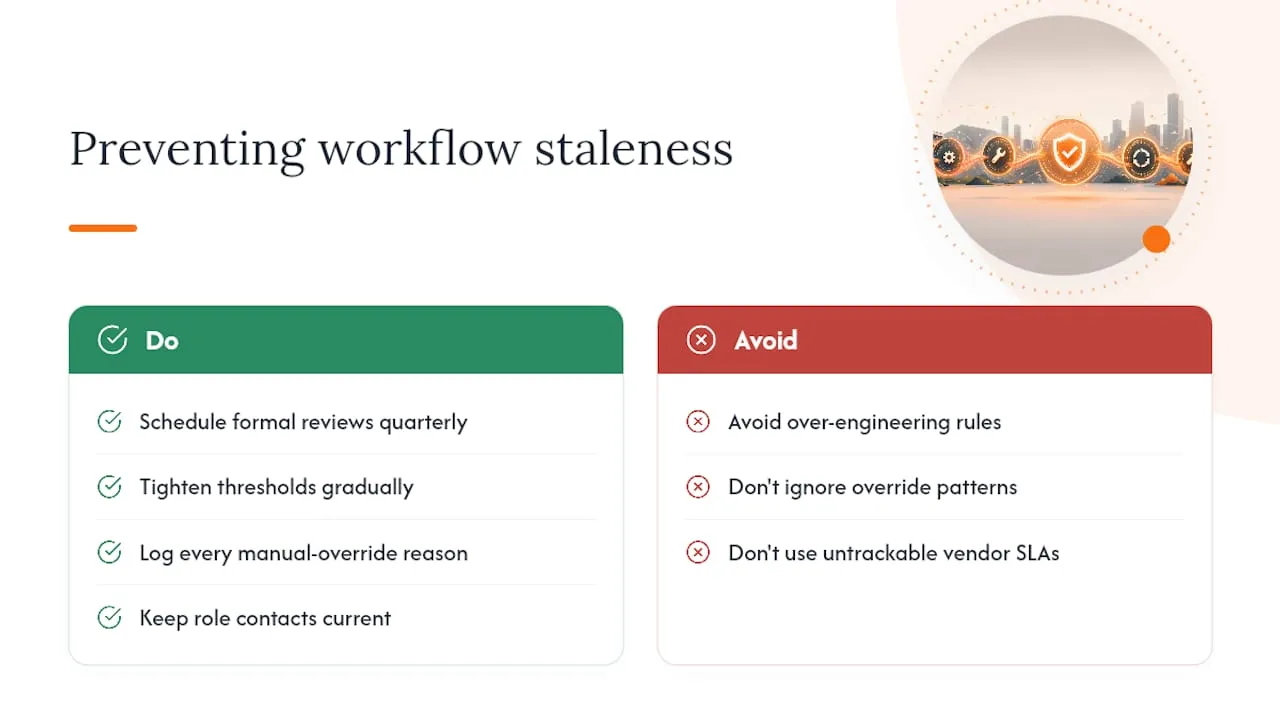
Escalation rules aren’t a set-and-forget system. Put a formal review on the calendar, quarterly works for most teams, and use it to tighten thresholds gradually as your data improves rather than overhauling everything at once.
Every time someone uses a manual override, log the reason. A pattern of overrides on the same rule usually means the rule itself is wrong, not the staff using it. Keep role contacts current as people change positions, and make sure vendor contracts specify SLA terms your automation can actually track. Workflow architecture guidance from the Work Management Institute warns against over-engineering here: a clear primary path with a few conditional branches beats a rulebook nobody can hold in their head.
What Automated Escalation Looks Like in Practice
Property managers running RealtevoOS report saving several hours a week once maintenance alerts, resident messaging, and vendor follow-up consolidate into one dashboard instead of scattered texts and spreadsheets. That consolidation is the same principle behind every escalation workflow in this article: fewer places for a signal to get lost.
If you’re piloting automated escalation, measure your baseline MTTA and SLA breach rate before you flip the switch, then compare after 30 days. For more on how automated routing fits into broader operations, see types of maintenance workflows for vacation rental managers.
Jose Villeda covers operational workflows for multi-property management teams.
What Actually Matters When You Build This
Most escalation failures I see aren’t caused by missing rules, they’re caused by too many rules. Teams write an elaborate tiered matrix for every conceivable failure mode, then staff start ignoring alerts because half of them aren’t real emergencies. Alert fatigue kills more workflows than under-design ever does.
Pilot one severity tier first. Measure it. Expand only what the data justifies. And keep the decision simple enough that someone half-asleep at 2 a.m. can still make the right call.
— Jose Villeda
Turning These Rules Into a Working System
Writing the rules is the easy part. Keeping them enforced across every property, every shift, and every vendor relationship is where most maintenance teams stall out, especially once a portfolio grows past a handful of units and the same escalation logic has to run consistently everywhere.

RealtevoOS was built as the command center for exactly this problem. It centralizes maintenance alerts, resident and vendor messaging, and audit trails in one dashboard instead of the scattered texts and spreadsheets most operators still rely on. Every acknowledgment gets logged automatically, so you have the compliance-ready record this article recommends without a manual entry. If you’re testing this out, start with a small pilot: pick your highest-volume property, route its critical and safety-tagged work orders through automated tiers, and track your MTTA and SLA breach rate for 30 days against your baseline. Multi-property teams managing cross-department handoffs, similar to the coordination challenges outlined in this hotel check-in workflow guide, tend to see the biggest early gains. Check out the RealtevoOS command center to see how the automated routing maps to your current tiers.
Where to Read More on Escalation Design
- Atlassian’s escalation policy guide breaks down hierarchical versus functional models in more technical detail.
- AWS’s Well-Architected escalation path guidance covers pre-approved mitigation actions for technical operations teams.
- Uptime Labs’ incident escalation process walks through severity matrices and escalation drills.
- Hyperping’s practitioner findings on escalation protocol document real-world failure rates in manual systems.
Sources
- Escalation policies for effective incident management | Atlassian
- OPS10-BP04 Define escalation paths | AWS Well-Architected
- Incident escalation process: When to escalate, how to escalate, and who decides | Uptime Labs
- Escalation protocol (practitioner findings) | Hyperping blog