Guesty Integration Guide: Marketplace Setup and Open API
Discover how to streamline your Guesty integration with quick setups or custom APIs, optimizing your workflow in minutes.

Guesty Integration Guide: Marketplace Setup and Open API
If your workflow needs already exist as a packaged tool, connect a Guesty Marketplace partner and you’re syncing data within minutes. If you need custom logic, proprietary reporting, or a system Guesty doesn’t natively support, you’ll want the Open API and webhooks instead. Start here: in Guesty, go to Integrations → Marketplace to browse ready-made partners, or Integrations → OAuth Applications to generate credentials for a custom build.
Both paths are documented directly by Guesty:
- The Marketplace overview explains partner categories and connection flow.
- The Open API quick start guide covers authentication, endpoints, and rate limits.
- RealtevoOS sits on top of either path, consolidating what flows out of Guesty into one operational dashboard.
Pro Tip: Before building anything custom, check the Marketplace tile list first. Most “we need a custom integration” conversations end once a manager discovers a partner already does the job.
Key Takeaways
Choosing the right Guesty integration route comes down to one distinction: Marketplace partners deliver plug-and-play speed, while the Open API delivers control for workflows nothing pre-built can handle.
| Point | Details |
|---|---|
| Start with Marketplace | Check Integrations → Marketplace before building anything custom; most needs are already covered. |
| Copy API keys immediately | The generated key expires four hours after creation, so paste it into the partner app right away. |
| Cache OAuth tokens | Custom API builds should cache Bearer tokens to avoid rate-limit throttling. |
| Pilot before scaling | Test one Marketplace connection for two to four weeks before rolling it out portfolio-wide. |
| Consolidate with RealtevoOS | RealtevoOS centralizes messaging, tasks, and owner reporting once Guesty data starts flowing. |
Table of Contents
- What Are the Guesty Integration Categories in the Marketplace?
- How Do You Connect a Guesty Marketplace Integration?
- How Does the Guesty Open API Handle Authentication and Rate Limits?
- Which Guesty Integration Workflows Should You Build First?
- Why Do Guesty Integrations Break, and How Do You Fix Them?
- How RealtevoOS Fits Alongside Your Guesty Integrations
- Bring It All Together With RealtevoOS
- Sources
What Are the Guesty Integration Categories in the Marketplace?
Guesty’s Marketplace organizes partners into functional groups, and knowing which one matches your problem saves you from evaluating dozens of irrelevant tiles. The Marketplace overview splits partners into integrated partners (direct data streaming with a one-click “Connect” button), community partners, payment providers, and Guesty Add-ons.
Here’s how the categories break down by function:
- Revenue management: Pricing tools push updated rates directly into Guesty, which then republishes them across connected channels. This solves the manual spreadsheet problem most portfolios outgrow around property five or six.
- Operations: Task and cleaning platforms sync reservation data so turnovers get created automatically, without a manager copying dates into a separate app.
- Property protection and monitoring: Noise and occupancy sensors send alerts into Guesty’s workflow, flagging issues before they become guest complaints or property damage.
- Guest experience: Digital guidebooks, upsell tools, and messaging platforms pull reservation details to personalize communication automatically.
- Marketing and distribution: Channels like Google Vacation Rentals require specific listing content, and Guesty’s own channel connection guide notes prerequisites like a minimum photo count and a verification period that can run up to three weeks.
- Payments: Dedicated processors handle guest charges and owner payouts without manual reconciliation.
Custom data mapping only makes sense when your business logic doesn’t fit a partner’s standard configuration, or when you’re syncing with an internal system no partner supports.
How Do You Connect a Guesty Marketplace Integration?
Connecting an integrated partner takes a handful of steps, but the timing on one of them matters more than people expect.
- Log into Guesty with an admin-level account. Standard user roles typically can’t authorize new integrations.
- Navigate to Integrations → Marketplace and find the partner tile you want to connect.
- Click Connect. For integrated partners, this triggers the API key generation flow described in Guesty’s copying API key instructions.
- Copy the generated API key immediately and paste it into the partner application’s connection field. The key expires four hours after generation, so don’t generate it and walk away.
- If you manage multiple listings under a Guesty HQ account, confirm whether the integration needs to sync at the sub-account level or the HQ level. This trips up multi-brand portfolios more than any other step.
- Once connected, check the partner’s sync timestamp inside Guesty. Create a test reservation or task and confirm it appears on the partner side within the expected window.
Pro Tip: Screenshot the connection confirmation and sync timestamp the day you set it up. When something breaks three months later, that baseline is the fastest way to tell support “it worked on this date, with this configuration.”
Some partners require additional onboarding, like mapping specific listing fields or setting notification preferences, so budget an extra 15 to 20 minutes beyond the core connection steps.

How Does the Guesty Open API Handle Authentication and Rate Limits?
Custom integrations run on OAuth 2.0. You create an OAuth application inside Guesty, which issues a client ID and client secret. Your integration exchanges those credentials for a Bearer token, and that token authenticates every subsequent API call. Guesty’s quick start guide documents the full flow, along with endpoints covering listings, reservations, guests, tasks, and webhooks.
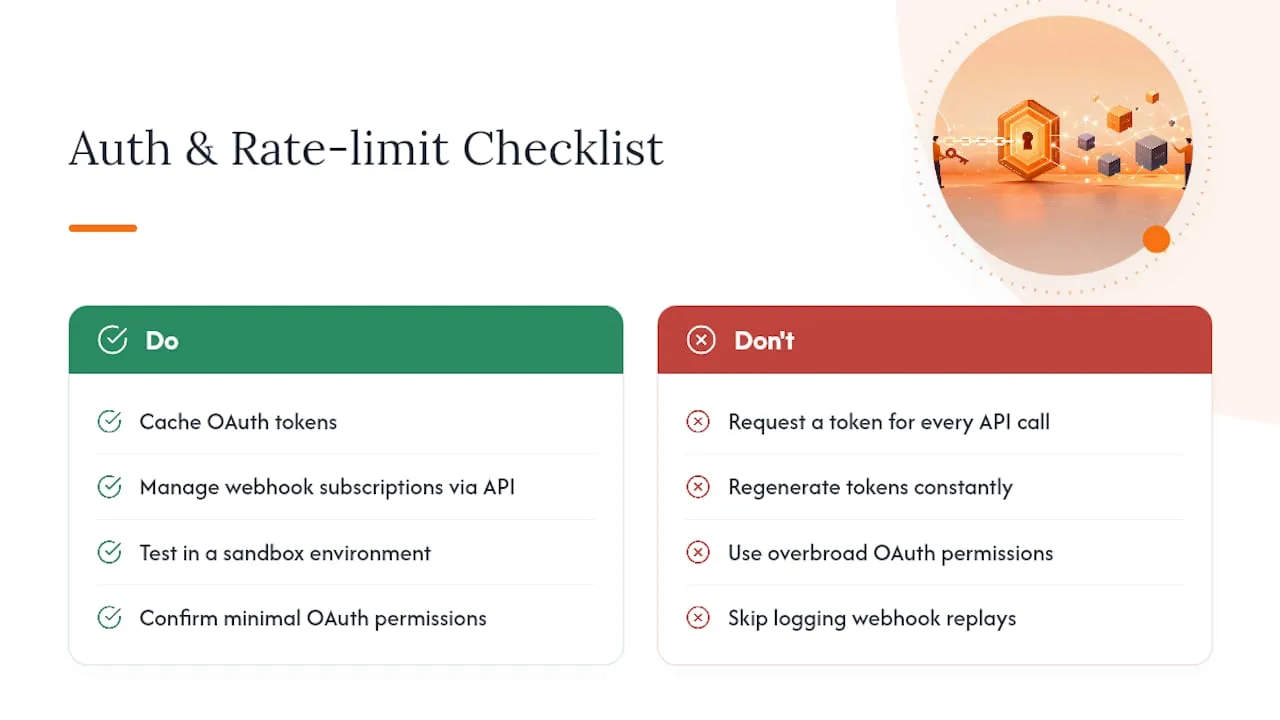
Tokens expire, and requesting a new one for every single API call is the fastest way to hit throttling. Guesty explicitly recommends caching tokens rather than regenerating them constantly, and provides an analytics dashboard so you can monitor usage against your rate limits in real time.
Webhooks deserve their own attention. Guesty lets you manage webhook subscriptions through the API, including a signing secret to verify payload authenticity and the ability to replay missed events. The most common mappings are reservation events (created, updated, canceled) and task events (created, completed). A Postman collection is available for testing endpoints before you write production code, and if your build touches booking flows, the Booking Engine API has its own activation steps and reservation-flow requirements worth reviewing separately.
Token caching isn’t a nice-to-have optimization. It’s the difference between a stable integration and one that mysteriously stops working every time your token-request volume spikes.
Before going live, run a developer checklist: test in a sandbox environment, confirm your OAuth application has the exact permissions your integration needs (nothing broader), log every webhook replay attempt for debugging, and document your field mappings somewhere your team can find them later.
Which Guesty Integration Workflows Should You Build First?
Four recipes cover most of what property managers actually need, and each one follows a predictable pattern once you understand it.
- Pricing sync: Your revenue tool calculates and publishes new rates, Guesty receives the update via API or Marketplace connection, then pushes those rates to every connected OTA. Add a verification step that checks for manual rate overrides before the automated push, or you’ll overwrite a manager’s intentional pricing decision.
- Turnover automation: A confirmed reservation triggers task creation in Guesty. A webhook notifies the connected cleaning app, the cleaner completes the job and updates status in their app, and that status syncs back to Guesty automatically.
- Guest messaging and upsells: A reservation event fires an automated message and a digital guidebook link through a Marketplace guest-experience partner, no manual sending required.
- Owner reporting: Reservation and expense data gets aggregated and exported via API into an accounting tool or into a consolidated reporting pipeline like RealtevoOS.
Pro Tip: Build the turnover automation recipe second, after pricing sync. It has the highest visible payoff for cleaning teams and gives you a fast, obvious win to point to when justifying further integration work.
Why Do Guesty Integrations Break, and How Do You Fix Them?
When a sync stops working, check four things in order: API logs for failed calls, webhook delivery status and replay history, the partner’s last successful sync timestamp, and whether anyone recently changed user roles or permissions.
The usual culprits are mundane. An API key expired because someone regenerated it and forgot to update the partner app. A property ID changed after a listing was rebuilt. You hit a rate limit because tokens weren’t cached, a pattern the Open API documentation flags directly. Or the partner changed something on their end without telling you.
- Cache tokens and monitor the usage dashboard weekly, not just when something breaks.
- Audit field mappings quarterly, especially after any Guesty or partner platform update.
- Document a failover procedure so a broken sync doesn’t halt operations while you troubleshoot.
- Escalate to Guesty support for platform-side issues (webhook delivery, API errors) and to the partner for their-side configuration; have logs and timestamps ready for both.
How RealtevoOS Fits Alongside Your Guesty Integrations
Guesty and its Marketplace partners handle the sync layer. RealtevoOS handles what happens after the data lands: turning scattered updates from Guesty, Airbnb, and Vrbo into one command center instead of five open tabs.
- Centralizes guest messaging across properties instead of monitoring each partner app separately.
- Batches turnover and maintenance tasks generated by your Guesty automations into one team view.
- Builds owner reports automatically from the reservation and expense data already flowing through your stack, cutting the manual compilation work managers usually absorb.
For portfolios running several Marketplace integrations at once, that consolidation layer is often what separates a manageable operation from one drowning in dashboards. Property managers using AI-driven automation alongside their PMS integrations typically report the biggest time savings in reporting and communication, exactly where fragmentation costs the most hours.
Choosing Between Marketplace and Custom API: A Quick Checklist
Weigh four things: time to value, budget, in-house developer capacity, and whether a vendor already covers your need. Small portfolios should default to Marketplace; enterprise operations with proprietary logic often justify custom builds. Either way, pilot one Marketplace connection before committing engineering time to anything custom.
— Jose Villeda
Bring It All Together With RealtevoOS
Guesty and its Marketplace partners solve the sync problem. They don’t solve what happens after ten different tools are all pushing updates into your day, one Slack ping, one dashboard, one spreadsheet at a time. That’s the gap RealtevoOS closes: a single command center that pulls your Guesty data, guest messaging, task management, and owner reporting into one place instead of scattering it across every partner app you’ve connected.

If you’re managing more than a handful of properties and already juggling two or three Marketplace integrations, that consolidation typically pays for itself in hours reclaimed each week. Pair it with a resource like Wild Foodz’s efficiency workflow guide for the operational side, and RealtevoOS for the technology side. Visit RealtevoOS and start a trial to see how your existing Guesty integrations feed straight into a single operational view.
Sources
Recommended
- Multi-Market Management Guide for Vacation Rental Pros — Realtevo Blog
- Why Integrate Data from Airbnb and Vrbo: 2026 Guide — Realtevo Blog
- Rental Channel Integration: What Every Vacation Rental Manager Must Know — Realtevo Blog
- Remote Property Monitoring Setup Guide for Vacation Managers — Realtevo Blog