Coordinating Cleaning Teams Across Multiple Properties
Centralize your multi-property cleaning team coordination with AI. Save time, ensure quality, and eliminate missed turnovers effortlessly.
Coordinating Cleaning Teams Across Multiple Properties
The fastest way to fix multi-property cleaning team coordination is to centralize every turnover on an AI operations platform that connects your PMS, cleaner pool, and quality checks in one place. Manual dispatching breaks at scale. An AI-driven system like Realtevoos handles mission creation, cleaner assignment, and photo verification automatically, so you stop rebuilding the schedule every morning.
Why it works for portfolio-scale turnovers:
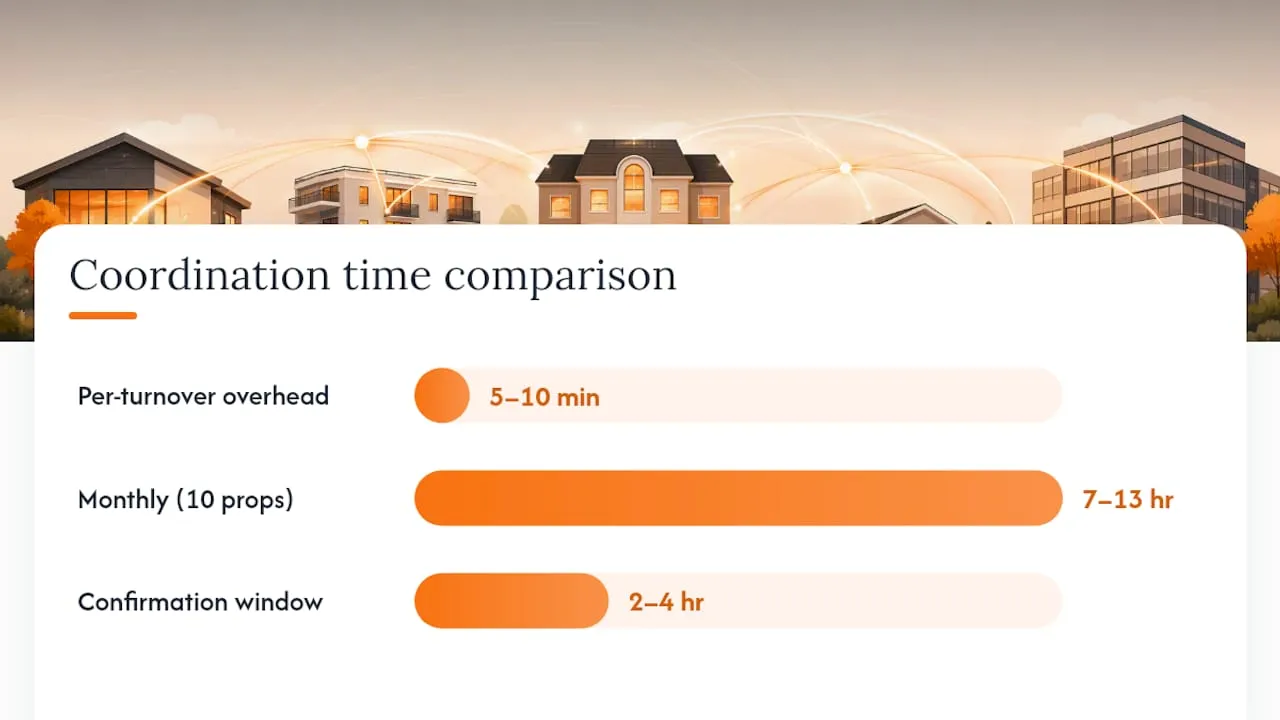
- Time saved: Coordination overhead runs 5–10 minutes per turnover; at 10 properties that adds up to 7–13 hours of manual work every month.
- Fewer missed turnovers: Assigning a primary plus a backup cleaner per property, with a 2–4 hour confirmation window, prevents the scramble when someone cancels.
- Consistent quality: Automated photo checklists and property-specific digital missions keep standards uniform across Airbnb, Vrbo, and every other channel you manage.
Your immediate next step: Run a 30-day pilot on 3–6 properties. Assign a primary and backup cleaner to each, connect your PMS calendar, and enable automated mission creation on checkout. That single change removes you from the daily dispatch loop.
Key Takeaways
AI-driven multi-property cleaning coordination pays back within 60 days when you map your cleaner pool correctly, automate mission creation from PMS checkouts, and enforce photo-based QA on every turnover.
| Point | Details |
|---|---|
| Automate mission creation first | Connect your PMS via API so checkout events trigger missions instantly, removing daily manual dispatch. |
| Primary plus backup per property | A 2–4 hour confirmation window with auto-escalation to the backup prevents missed turnovers. |
| Photo proof closes every mission | Requiring photos for kitchen, bathrooms, and bedrooms shifts QA accountability to the cleaner. |
| Track cost per turnover monthly | A per-mission ledger surfaces margin erosion early and supports fee renegotiations with data. |
| Realtevoos runs the full stack | Realtevoos connects Airbnb, Vrbo, Guesty, and Hostaway via API and automates dispatch, QA, and payroll in one platform. |
Table of Contents
- How do you set up automated turnover scheduling across a portfolio?
- Turnover checklist and messaging templates your team can use today
- Which integrations does your tech stack actually need?
- What KPIs should you track, and what ROI can you expect?
- How do you hire and onboard cleaners for a multi-property operation?
- How do you handle cancellations, same-day flips, and emergencies?
- What does a realistic implementation timeline look like?
- How does Realtevoos handle AI-driven cleaning coordination?
- What actually changes when your team moves to AI coordination
- Ready to run your 30-day pilot with Realtevoos?
- Sources
How do you set up automated turnover scheduling across a portfolio?
Moving from manual coordination to automated cleaner assignment takes five deliberate steps.
-
Map your cleaner pool. For each property, assign one primary cleaner and one backup. Define eligibility rules: geography (max drive time), skill level, and maximum daily missions. This data becomes the engine for every automated assignment.
-
Connect your PMS and channel calendars. Link Airbnb, Vrbo, Guesty, or Hostaway via API. A confirmed checkout event triggers mission creation automatically, no manual entry required. Automating mission creation from confirmed checkouts is the highest-leverage early win because it removes the daily routing burden immediately.
-
Choose your assignment pattern. Use balanced auto-assignment when onboarding new cleaners; it distributes missions evenly and builds familiarity. Switch to first-to-respond routing for mature, flexible pools that need surge absorption. Keep a manual override available for VIP properties or unusual circumstances.
-
Set your confirmation window. Give the primary cleaner 2–4 hours to accept. If the window closes without a response, the system auto-notifies the backup. No coordinator intervention needed.
-
Attach a digital checklist and photo requirements to every mission. Failed photo submissions trigger an auto-escalation to the coordinator before the next guest checks in.
Pro Tip: A 10-property portfolio at 60% occupancy generates roughly 60 cleaning missions per month. Build your cleaner pool and zone rules before you automate, not after, or the system will assign missions to cleaners who cannot realistically reach the property.
Turnover checklist and messaging templates your team can use today
Per-property digital turnover checklist (room-by-room):
- Kitchen: wipe all surfaces, clean appliances inside and out, restock consumables to par level, photo required
- Bathrooms: scrub toilet, tub, and sink; replace towels and toiletries to par; photo required for each bathroom
- Bedrooms: strip and remake beds, check under furniture, replace any damaged linens; photo required
- Living areas: vacuum, dust, reset furniture to layout photo, check remotes and chargers
- Critical vs. if-time tasks: mark kitchen and bathrooms as critical; deep-cleaning closets as if-time
Per-turnover supplies typically run $40–$70 before optimization; setting par levels and requiring restocking to par at every visit controls that cost.
Three messaging templates:
Template 1 — Cleaner assignment: Template 2 — QA fail to cleaner: Template 3 — Guest notification of cleaning issue: Standardized digital checklists with photo verification prevent quality drift across rotating cleaners and reduce guest complaints measurably.
Which integrations does your tech stack actually need?
Prioritize connections in this order to avoid common implementation mistakes:
-
Calendar and PMS first. API connections to Airbnb, Vrbo, Guesty, and Hostaway deliver real-time checkout events and handle rapid booking edits or cancellations. iCal is faster to set up but can miss same-day changes. For multi-channel booking management, API is the only reliable choice.
-
Cleaner dispatch channel second. WhatsApp Business API or a native app notification layer gets missions to cleaners instantly and captures accept/refuse responses in the system record.
-
Photo-checklist and QA tool third. This is where quality control lives. Every mission needs a photo submission gate before it closes.
-
Payments, payroll ledger, and reporting last. Once missions close with verified photos, payout calculations run automatically.
Additional integration checklist:
- Smart-lock or keypad code delivery tied to mission start time
- Expense extraction for supply costs per property
- Data integration guidance for API vs. iCal tradeoffs in your specific PMS setup
What KPIs should you track, and what ROI can you expect?
Core KPIs to monitor:
- On-time cleaning rate (target: 95%+)
- Average cleaning duration per property type
- Confirmation latency (time from mission dispatch to cleaner acceptance)
- Percentage of turnovers with complete photo proof
- Incident rate: no-shows, cancellations, and emergency replacements
- Cost per turnover (labor plus supplies)
Reporting cadence: Run a same-day “today card” for all same-day flips, a weekly exception report for incidents and QA failures, and a monthly cost-per-door view for margin analysis.
Operators who adopt automation tools report 31% portfolio growth versus 12% for non-adopters, which reflects how much capacity frees up when coordination runs itself.
How do you hire and onboard cleaners for a multi-property operation?
Hiring checklist:
- Confirm STR-specific experience and at least two verifiable references from short-term rental operators.
- Verify mobility: can they reach your property zones within your defined drive-time limit?
- Confirm they own or can supply their own equipment.
- Run a paid trial clean with photo submission before adding them to the live pool.
Onboarding module:
- Provide a property manual for every unit they will cover (layout photos, lock codes, supply locations).
- Walk through the digital checklist for each property type they will handle.
- Show sample passing and failing photo submissions so expectations are unambiguous.
- Confirm payment cadence and backup commitment in writing.
Performance and incentives: Offer quality bonuses for cleaners who maintain high photo-review scores. Add surge premiums for last-minute accepts. Use periodic spot-inspections to catch drift early, and map cleaning cost per property to identify margin erosion before it compounds.
Pro Tip: A two-person parallel workflow, one handling bathrooms and bedrooms while the other covers the kitchen and living areas, can cut total turnover time by 30–40% versus sequential room-by-room cleaning. For larger units, build this split into your onboarding training from day one.
How do you handle cancellations, same-day flips, and emergencies?
A missed turnover can cost up to $3,500 in refunds, emergency fees, and review damage. Your SOP needs to prevent that before it starts.
Backup pool SOP:
- Assign 1–2 backup cleaners per zone, not per property.
- Rotate 1–2 turnovers per month to backup cleaners so they stay familiar with the property and can absorb cancellations without dropping quality.
- Every backup must have the property manual and access codes before they are ever needed.
Surge and same-day flip rules:
- Define a surge pay threshold (for example, missions accepted within 3 hours of checkout).
- For partial-clean scenarios, use a priority checklist: bathrooms and bedroom linens first, kitchen second, living areas third.
- Route cleaners by travel time, not alphabetical order.
Auto re-broadcast and escalation:
- If a mission goes unaccepted after the primary’s confirmation window, auto-repost to the backup pool immediately.
- If the mission remains unclaimed after a second defined window (typically 30–60 minutes), auto-notify the coordinator by SMS or push alert.
What does a realistic implementation timeline look like?
| Phase | Duration | Properties | Key Activities |
|---|---|---|---|
| Pilot | 30 days | 3–6 | Map cleaners, connect PMS, enable auto-mission creation |
| Scale | 2–3 months | 10 | Expand cleaner pool, add QA gates, activate reporting |
| Steady state | Ongoing | Full portfolio | Automated QA, monthly cost-per-door review, KPI dashboards |
Cost categories to budget:
- SaaS subscription (monthly, scales with property count)
- Optional paid onboarding and setup services
- Cleaner surge premiums for backup accepts
- Coordinator labor during the pilot phase (reduces significantly after)
Most operators reach positive net savings within the first 60 days of the scale phase. High-performing STR operators consistently use a three-part system: reliable cleaning partner, clear checklist, and automation to sustain that efficiency as the portfolio grows.
How does Realtevoos handle AI-driven cleaning coordination?
Realtevoos maps every operational step in this guide to a specific platform feature, so you are not stitching together separate tools.
- Automated mission creation: Checkout events from Airbnb, Vrbo, Guesty, and Hostaway trigger missions via API, no manual entry.
- Primary and backup cleaner rules: Define eligibility, geography, and confirmation windows directly in the platform; the AI handles dispatch and re-broadcast automatically.
- Photo-checklist QA: Every mission closes only after photo proof is submitted; failed reviews auto-escalate to the coordinator.
- Payroll and ledger: Cleaner payouts calculate per closed mission, with supply costs tracked per property.
- Centralized dashboard: One view covers today’s flips, open missions, QA flags, and cost-per-door metrics across your entire portfolio.
Property managers using Realtevoos report saving several hours per week on coordination alone, with fewer missed turnovers and measurably higher guest satisfaction scores. The operational efficiency gains compound as the portfolio grows because the system scales without adding coordinator headcount.
Pro Tip: Connect Guesty or Hostaway via API before your pilot launch. Real-time event triggers mean Realtevoos creates the cleaning mission the moment a checkout is confirmed, not hours later when a calendar sync finally refreshes.
What actually changes when your team moves to AI coordination
Most managers expect the technology to be the hard part. It is not. The real adjustment is organizational.
Daily dispatching disappears almost immediately, and that frees up the coordinator to focus on QA review and exception handling instead of building the morning schedule. Cleaners adapt quickly when the assignment and checklist system is consistent; the friction comes from properties with incomplete manuals or missing access-code setups, which is why the mapping phase before launch matters more than the software configuration itself.
The clearest operational win is QA ownership. When photo proof is required to close a mission, accountability shifts to the cleaner rather than the coordinator chasing confirmation. That single change tends to reduce re-clean requests within the first two weeks.
One honest watch-out: the initial data-cleanup required to map every property, cleaner, and eligibility rule correctly takes longer than most teams expect. Budget a full week for a 10-property portfolio before the pilot goes live. Rushing that step produces mis-assignments on day one, which erodes cleaner trust in the system before it has a chance to prove itself.
Ready to run your 30-day pilot with Realtevoos?
Property managers who coordinate turnovers manually across 10 or more units spend 7–13 hours every month on tasks the platform handles automatically. Realtevoos connects directly to Airbnb, Vrbo, Guesty, and Hostaway via API, creates cleaning missions on checkout, routes them to your primary and backup cleaners, enforces photo-based QA, and closes the payroll ledger per mission. No spreadsheets. No morning dispatch calls.

The Realtevoos Management Deck is built for exactly this pilot: a 30-day run on 3–6 properties with your cleaner pool mapped, your checklists loaded, and your PMS connected from day one. Onboarding services are available if you want a faster setup. Request your demo or start your pilot at Realtevoos and see how much coordination time you recover in the first week.
Sources
The sources below support the operational recommendations and benchmarks in this guide.
- Manage Cleaners Across Multiple Properties | Guide | TidyStay
- Manage Multiple Cleaning Teams Across 10+ Properties
- How to Run Cleaning and Turnovers Across a Multi-Property Airbnb Portfolio | MagicBNB
- Vacation Rental Turnover Cleaning Checklist (2026) | Room-by-Room | RapidEye