Remote Property Monitoring Setup Guide for Vacation Managers
Explore our remote property monitoring setup guide to streamline operations. Learn to integrate AI for bookings, maintenance, and guest messaging.

Remote Property Monitoring Setup Guide for Vacation Managers
The fastest way to stop operational failures across your portfolio is a centralized, AI-enabled command center that pulls bookings, PMS data, cleaning status, and maintenance events into one dashboard. Realtevoos is the recommended platform for fast deployment and native integrations. Start here:
- Gather credentials for your PMS, Airbnb, Vrbo, channel manager, accounting tool (QuickBooks or Xero), DocuSign, and cleaning app.
- Export your property list as a CSV with canonical property IDs, owner contacts, and standard rates.
- Assign one implementation owner who can approve API access and coordinate with your ops lead.
- Schedule a 2-week pilot for 5–10 properties before full rollout.
This approach eliminates dashboard-hopping, prevents missed cleanings and double bookings, and unlocks AI automations for guest messaging, inspection triage, and owner reporting. Operators running fragmented manual processes see measurable operational failures during turnovers — a centralized stack directly addresses that risk.
Table of Contents
- What do you need to prepare before connecting any systems?
- How do you configure your remote monitoring system step by step?
- Which integrations actually move the needle for your portfolio?
- Automation templates that handle your most repetitive workflows
- How do you keep your data secure and compliant in the US?
- What does a realistic implementation timeline and budget look like?
- How do you measure success and keep improving after launch?
- What setup mistakes will slow you down or break your integrations?
- How does Realtevoos implement these steps for you?
- Key Takeaways
- The part most implementation guides skip entirely
- Your entire rental operation, one command center
- Useful sources for your implementation
What do you need to prepare before connecting any systems?
Before you touch a single integration, lock down four categories of readiness.
Accounts and credentials:
- PMS login and API key (Guesty, Hostaway, or your current system)
- Airbnb and Vrbo host accounts with API or channel manager access
- Pricing engine credentials
- QuickBooks or Xero accounting access
- DocuSign admin credentials
- Cleaning and field ops app login
Property inventory data:
- Canonical property IDs (one ID per listing, consistent across all tools)
- Owner contacts, standard nightly rates, amenity lists, linen counts, and emergency contacts
- Cleaning rules per property (turnover time, linen swap frequency, restocking thresholds)
Stakeholders to assign:
- Implementation owner (internal point of contact)
- IT or admin who can approve OAuth and API access
- Operations lead who owns workflow design
- Accounting lead who validates payout snapshots
Documents to export:
- Property list CSV
- 90-day booking calendar
- Vendor list (cleaners, maintenance contractors)
- Owner payout templates
Pro Tip: Build one canonical property spreadsheet before your first onboarding call. Map every property ID to its PMS record and OTA listing ID. This single document cuts mapping time in half and prevents the naming inconsistencies that break integrations later.
A resilient local support network — vetted cleaners, backup access protocols, and emergency vendor contacts — belongs in this spreadsheet too. Tech alone does not cover same-day turnovers when a cleaner cancels.
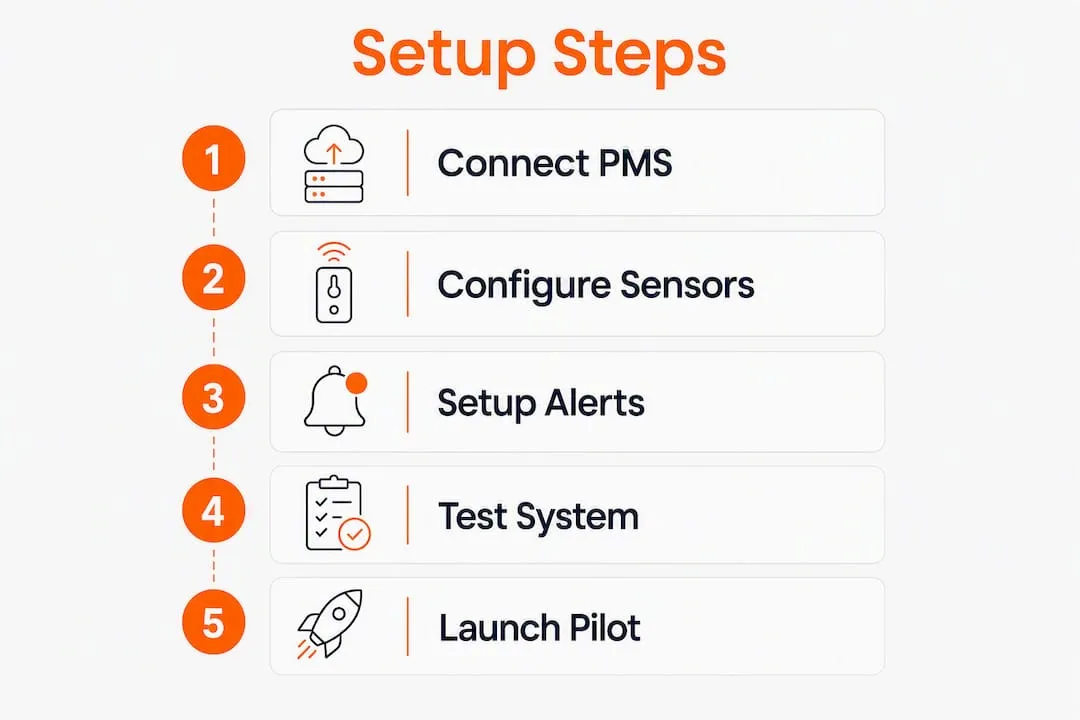
How do you configure your remote monitoring system step by step?
Follow this sequence during a live implementation. Each step has a clear owner and a validation gate before you move forward.
- Step 0 — Freeze your canonical CSV. Map every property ID to its PMS record and OTA listing ID. No step works reliably without this.
- Step 1 — Connect read-first integrations. Link your PMS, channel manager, Airbnb, and Vrbo. Validate booking and calendar sync for 30–60 minutes before proceeding.
- Step 2 — Connect operations sources. Add your cleaning app, maintenance ticketing system, and inspection/photo upload tool. Map cleaning missions to checkout events.
- Step 3 — Connect financial sources. Link accounting (QuickBooks or Xero) and your payouts feed. Run a test owner payout snapshot and confirm the numbers match your records.
- Step 4 — Build core dashboards. Configure occupancy, ADR, RevPAR, cleaning status, maintenance SLAs, and owner payout views. Assign separate views for ops teams and property owners.
- Step 5 — Enable AI automations in sandbox. Set up guest messaging templates, inspection photo flagging, cleaning triggers, and revenue pacing rules. Use preview-and-confirm mode — MCP-based connectors let AI assistants push updates only after you approve each action.
- Step 6 — Run a 2-week pilot on 5–10 properties. Check daily, log every sync failure or missed trigger, and refine automations before expanding.
- Step 7 — Full rollout and staff training. Assign role-based permissions, distribute an operations runbook, and hold short training sessions by team function.
Pilot checklist:
- 5–10 properties in one market selected
- One implementation lead assigned
- 2-week schedule confirmed
- Success criteria defined: sync reliability, reduced manual handoffs, cleanings triggered automatically
Pro Tip: Start your pilot in a single market. One time zone, one cleaner network, and one set of local vendors gives you a controlled environment to validate automations before you scale.
Full rollouts for large portfolios typically take several weeks depending on integration complexity. A small pilot can go live in under two weeks.

Which integrations actually move the needle for your portfolio?
A PMS manages bookings and data but does not execute physical operations — you need an orchestration layer that converts reservations into cleaning missions, inspections, and maintenance tickets. Here is how to prioritize your connections.
| Integration | What It Provides | Priority |
|---|---|---|
| PMS (Guesty, Hostaway) | Reservation source of truth, guest data, calendar | 1 — connect first |
| Channel manager / Airbnb / Vrbo | Booking events, calendar sync, nightly rates | 1 — connect first |
| Cleaning / field ops app | Mission triggers, completion confirmations, status updates | 2 |
| Accounting (QuickBooks / Xero) | Invoices, owner payouts, expense tracking | 3 |
| Inspection / photo ingestion | Turnover photo uploads, AI flagging | 4 |
| DocuSign | Signed owner contracts, vendor agreements | 5 |
Integrated dashboards that pull PMS, channel manager, and pricing engine data eliminate the need for multiple spreadsheets and logins — real-time portfolio analytics and automated owner reports become possible only when these sources connect natively.
Native API connections are non-negotiable for core functions. iCal feeds, CSV exports, and ad-hoc Zapier flows are common failure points during peak demand. Operators commonly run multiple tools; the gaps between them cause manual work and failures that compound as portfolios grow larger. Realtevoos connects natively to Guesty, Hostaway, Airbnb, Vrbo, DocuSign, and common accounting tools — no fragile middleware required.
Automation templates that handle your most repetitive workflows
Guest messaging sequence:
- Pre-arrival check (48 hours out): confirm check-in details, door code, and parking
- Arrival instructions (day of): send access info and house rules
- 24-hour follow-up: check satisfaction and surface any issues early
- Issue triage: escalate unresolved complaints to ops lead with a timestamped ticket
Cleaning and turnover automation: Checkout event posts → cleaning mission created automatically → cleaner confirms completion → system marks property “ready” → guest receives check-in confirmation. No manual handoff required.
Maintenance triage: Inspection photo uploaded → AI classifies issue (damage, staging error, maintenance need) → ticket created with severity level → auto-assigned to local vendor or escalated to ops lead. AI can triage turnover photos at scale and surface only actionable exceptions, freeing managers from reviewing every image manually.
Owner reporting automation: Scheduled weekly or monthly reports pull occupancy, ADR, RevPAR, and payout data → branded template populated automatically → distributed to owners via their filtered access view. Automated owner updates reduce the back-and-forth that consumes hours every month.
For guest-facing automation, the trigger types that matter most are time-based (X hours before check-in), event-based (checkout posted), condition-based (VIP guest or high ADR booking), and exception-based (no cleaner confirmation by deadline).
How do you keep your data secure and compliant in the US?
- Role-based permissions: assign least-privilege access — ops staff see cleaning and maintenance; owners see their own financials only; admins control integrations.
- OAuth over API keys: use OAuth where available; for API keys, record the scope, rotation schedule, and TTL for each connection.
- Minimum PII sync: only pull the guest data fields your operations actually require. Maintain an access log and a data-retention policy consistent with US hospitality norms.
- PCI and payment flows: never store raw card data. Use tokenized payment processors and confirm PCI compliance for any vendor handling payouts or refunds.
- Disaster recovery: document where personal data lives, who can access it, and maintain a restore plan for critical data flows.
Pro Tip: Run a scoped access review before enabling write permissions in production. Confirm every integration uses the minimum required scope — read-only where write access is not needed.
MCP-based AI connectors use OAuth approval and preview-and-confirm workflows, which means AI assistants cannot push changes without explicit user authorization. That pattern is the right model for any write-enabled integration.
What does a realistic implementation timeline and budget look like?
| Phase | Duration | Key Activities |
|---|---|---|
| Prepare | 1 week | Canonical CSV, credentials, stakeholder assignments |
| Connect and map | 1–2 weeks | PMS, OTA, ops, and financial integrations |
| Pilot | 2 weeks | 5–10 properties, daily checks, automation refinement |
| Iterate | 1–2 weeks | Fix sync issues, refine triggers, expand automations |
| Full rollout and training | 2–4 weeks | All properties, role permissions, runbook distribution |
Cost categories to budget:
- SaaS subscription (per-property monthly fee)
- Onboarding or setup service (optional, recommended for 20+ properties)
- Staff time for mapping, testing, and training
- Vendor fees for field ops integrations
- Optional paid API support for complex PMS configurations
Small pilots (5–10 properties) carry low implementation cost and can often be absorbed within the first month’s subscription. Portfolios of 50+ properties typically require paid onboarding and 4–8 weeks of effort. Track time-to-value by estimating weekly hours saved against your current manual workload — that number is what you bring to a budget approval conversation.
How do you measure success and keep improving after launch?
Core KPIs to track:
- Hours saved per week (baseline manual hours vs. AI-handled task count)
- Operational failures avoided (missed cleanings, double bookings, late maintenance responses)
- Occupancy rate, ADR, and RevPAR by property and portfolio
- Owner satisfaction score (response time, report accuracy)
- Maintenance SLA compliance rate
Reporting cadence:
- Daily: ops dashboard showing cleaning status, open maintenance tickets, and upcoming check-ins
- Weekly: exceptions review covering sync failures, SLA breaches, and automation misses
- Monthly: owner report with financials, occupancy, and SLA summary
Schedule a 30/60/90-day review after launch. At 30 days, validate sync reliability and automation trigger accuracy. At 60 days, re-balance notification routing and refine AI classification rules. At 90 days, expand automations to additional property types or markets.
Predictive maintenance workflows add another layer: tracking issue frequency by property lets you shift from reactive repairs to scheduled interventions, which reduces both cost and guest disruption. Automated maintenance tracking gives you the data to make that case internally.
What setup mistakes will slow you down or break your integrations?
Fragile integration traps:
- Relying on iCal or CSV exports for calendar sync — these fail silently during peak demand
- Using Zapier flows for core cleaning triggers instead of native API connections
- Granting broad API scopes when read-only access is sufficient
Human-process failures:
- No canonical property IDs (naming inconsistencies break every downstream mapping)
- Missing vendor contacts in the property spreadsheet
- No written fallback protocol when an integration goes down
Testing pitfalls:
- Skipping sandbox testing before enabling automations in production
- Running a pilot with fewer than 5 properties (too small to surface real failure modes)
- Not scoping write permissions before go-live
Troubleshooting checklist:
- Validate property ID mapping in your canonical CSV against PMS and OTA records.
- Confirm booking events are populating in real time — check API logs for 4xx or 5xx errors.
- Re-run a manual sync and compare output against source data.
- Inspect automation trigger logs for missed or duplicate fires.
- If a sync fails in production: revert to manual fallback, notify affected stakeholders, and open a support ticket with integration logs and timestamps.
How does Realtevoos implement these steps for you?
Every step in this guide maps directly to a Realtevoos capability.
| Setup Step | Realtevoos Capability |
|---|---|
| Connect PMS and OTA data | Native integrations with Guesty, Hostaway, Airbnb, Vrbo |
| Trigger cleaning missions | Automated turnover workflows from checkout events |
| Flag inspection photos | AI-powered photo review and exception surfacing |
| Owner reporting | Scheduled branded reports with owner-filtered access |
| Document workflows | DocuSign integration for contracts and agreements |
| Role-based access | Granular permissions by team function and property group |
Most vacation rental operators use AI for only one or two functions; the top-performing managers extend it across inspections, messaging, and revenue pacing. Realtevoos is built for that full-stack approach. Native integrations cut mapping time, built-in automation templates shorten pilot cycles, and AI inspection review eliminates manual photo triage entirely.
The Realtevoos Command Center gives you a single dashboard for every property, every platform, and every team function. During onboarding, you receive an integration checklist, a pilot plan, and a timeline scoped to your portfolio size.
Key Takeaways
A centralized, AI-enabled command center with native PMS and OTA integrations is the most direct path to fewer operational failures, measurable hours saved weekly, and real-time portfolio visibility.
| Point | Details |
|---|---|
| Prepare before you connect | Freeze a canonical property CSV with IDs, owner contacts, and vendor lists before touching any integration. |
| Prioritize native API connections | iCal and CSV workarounds fail during peak demand; native APIs are the only reliable option for core workflows. |
| Pilot 5–10 properties for 2 weeks | A controlled pilot surfaces sync failures and automation gaps before they affect your full portfolio. |
| Measure hours saved and failures avoided | Track weekly manual hours vs. AI-handled tasks and count missed cleanings and double bookings eliminated. |
| Realtevoos maps to every step | Realtevoos connects natively to Guesty, Hostaway, Airbnb, Vrbo, and DocuSign, with built-in AI automations for the full setup. |
The part most implementation guides skip entirely
The technical setup described in this guide is genuinely straightforward once your canonical property data is clean. The harder problem is change management. Teams that have run on spreadsheets and group texts for years do not automatically trust a new dashboard, even when it works perfectly.
The implementations that succeed fastest share one pattern: a short written runbook distributed before go-live, not after. When your cleaning coordinator knows exactly what a “mission created” notification means and what to do if it does not arrive, the automation works. When they do not, they call you instead.
The second thing most guides miss: measure both directions. Hours saved is the obvious metric. Operational failures avoided is the one that gets budget approved for the next phase. A missed cleaning that triggers a bad review costs far more than a month of SaaS fees. Quantify that number early and keep it visible.
AI tools for single functions are now table stakes in this industry. The managers pulling ahead are the ones who connect those functions into a single workflow — where a checkout event triggers a cleaning mission, the completed inspection updates the dashboard, and the owner report writes itself. That is not a future state. It is available now, and the setup timeline is measured in weeks, not months.
Your entire rental operation, one command center
Running 20, 50, or 100+ properties across Airbnb, Vrbo, and your own direct channel means your operational complexity compounds every time you add a listing. Realtevoos gives you the AI-powered command center that handles what your current stack cannot: real-time portfolio visibility, automated cleaning and maintenance workflows, AI inspection review, and owner reports that go out without you touching them.

The gap between a fragmented stack and a centralized one is not just efficiency — it is the difference between catching a missed cleaning before a guest arrives and finding out in a review. Realtevoos connects natively to Guesty, Hostaway, Airbnb, Vrbo, DocuSign, and your accounting tools, with built-in automation templates that shorten your pilot to two weeks.
Schedule a demo of the Realtevoos Command Center and walk away with an integration checklist, a pilot plan, and a timeline scoped to your portfolio. Your onboarding starts the day you connect your first property.
Useful sources for your implementation
- State of Vacation Rental Operations 2026 — industry data on operational failures and AI adoption across short-term rental operators. Start here for benchmarking.
- Data-Driven Vacation Rental Management: Real-Time Reporting — guidance on integrating PMS, channel manager, and pricing engine data into a unified dashboard. Conceptual reading for KPI configuration.
- Beyond the PMS: The Operational Platform Behind Scalable STR — explains why a PMS alone does not execute field operations and what an orchestration layer adds. Read before Step 2.
- Remote Property Management: Boots on the Ground Blueprint — best practices for local vendor networks, backup access protocols, and resilient tech stacks. Useful for the quick-start checklist.
- The Hidden Cost of a Fragmented STR Tech Stack — data on how running 6–10 disconnected tools creates compounding operational gaps above 20–30 properties. Reference for budget approval conversations.
- Use ChatGPT or Claude to Manage Vacation Rentals — explains MCP connectors, OAuth approval flows, and preview-and-confirm AI operations. Integration documentation for Step 5.
- Realtevoos Command Center — product page for the Realtevoos Command Center with integration list, feature overview, and demo path. Your next step.
- AI Benefits for Rental Managers: 2026 Guide — Realtevoos guide covering ROI metrics and AI use cases across inspections, messaging, and revenue pacing.
- Top Vacation Rental Marketplace Alternatives — overview of distribution channel options relevant to multi-platform portfolio strategy.